Fashion Linden · theme for nopCommerce
The nopCommerce theme for fashion and clothing stores.
Colour swatches, size buttons with stock per size, size guides, size alerts, Shop the look and a homepage you change in the admin area. One package for nopCommerce 4.70, 4.80, 4.90 and 5.00.
Want to see it running? Ask for a demo and we’ll show it to you.
- nopCommerce
- 4.70 to 5.00
- For
- Fashion, shoes, accessories
- Price
- Loading price
Linden on nopCommerce 5.00
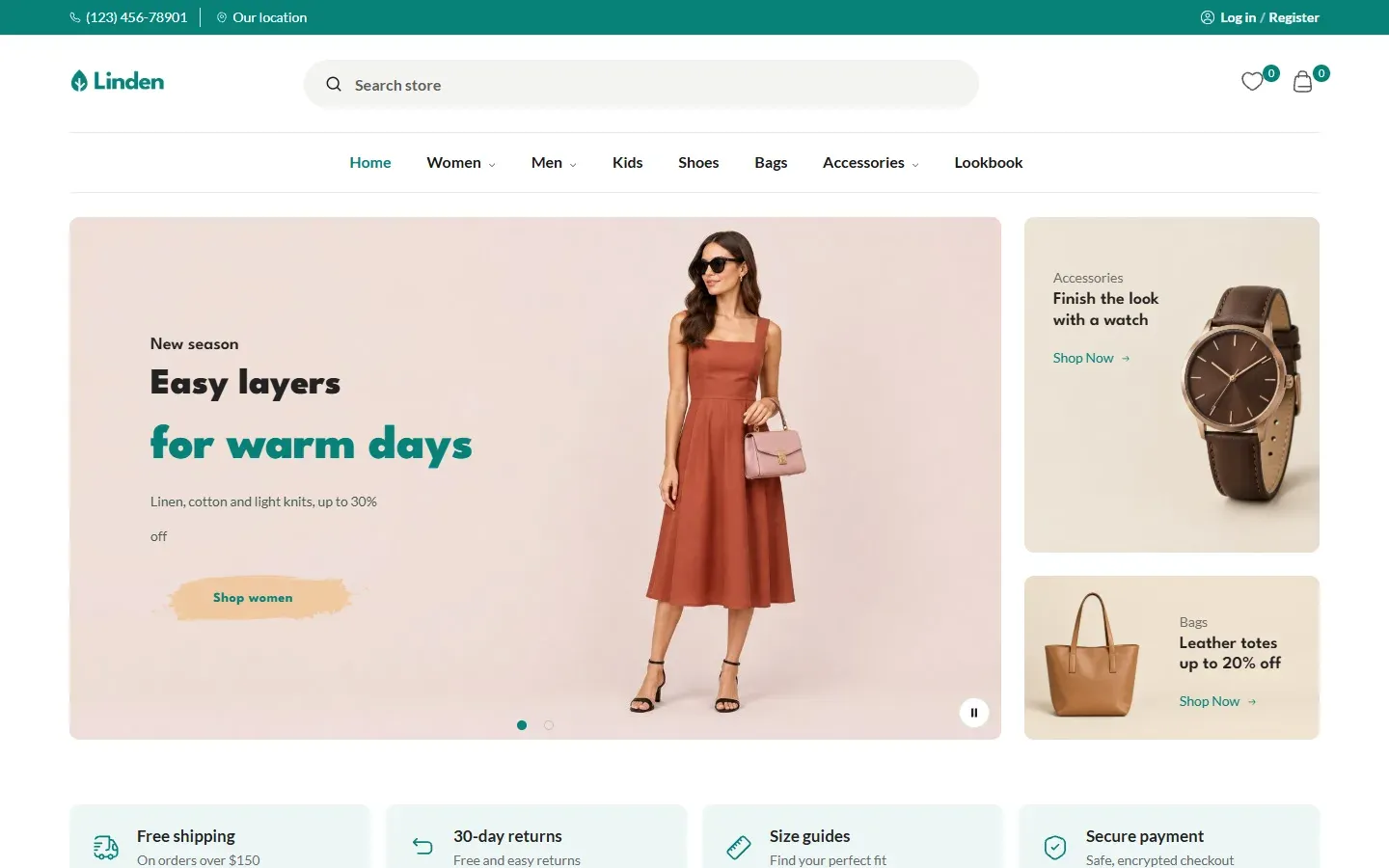
- Swatches
- Size guides
- Size alerts
- Shop the look
- Homepage builder
Why Linden
Built around how people buy clothes
Clothing is bought by colour and size, and returned when it doesn’t fit. Linden puts colour, size and fit first on every page, and adds what nopCommerce doesn’t have for fashion stores.
- nopCommerce versions, one package
- 4
- homepage section types
- 17
- nopCommerce files changed
- 0
- WCAG 2.2 accessibility target
- AA
Made for clothing
Colour swatches, size buttons with stock per size, size guides and model information: the things that decide whether a garment is bought, and whether it comes back.
Sell the sizes that sold out
nopCommerce’s back-in-stock alert doesn’t work when stock is kept per size. Linden adds alerts per size, and a report of which sizes shoppers are waiting for.
Run it from the admin area
Homepage sections, menus, banners, colours, fonts, looks and size guides are all edited in nopCommerce admin, per store. No code for a new season.
Ready for Google Shopping
Each garment is described to Google as a product group with its colour and size variants, gender, age group and material, which nopCommerce alone doesn’t do.
Accessible and mobile first
Built to WCAG 2.2 AA, with a contrast check on your colours, right-to-left support and an add to cart bar that stays in reach on phones.
One package, four versions
One upload for nopCommerce 4.70, 4.80, 4.90 and 5.00: nopCommerce installs the build for its own version, and the same file updates the theme later.
Choosing a theme for a clothing store? Our nopCommerce fashion theme guide explains what to look for, page by page, and what nopCommerce does on its own.
Product tour
See the store your shoppers will use
Screenshots from a nopCommerce 5.00 store running Linden with its fashion demo catalog. Choose a feature to see what it does.
01 / 07
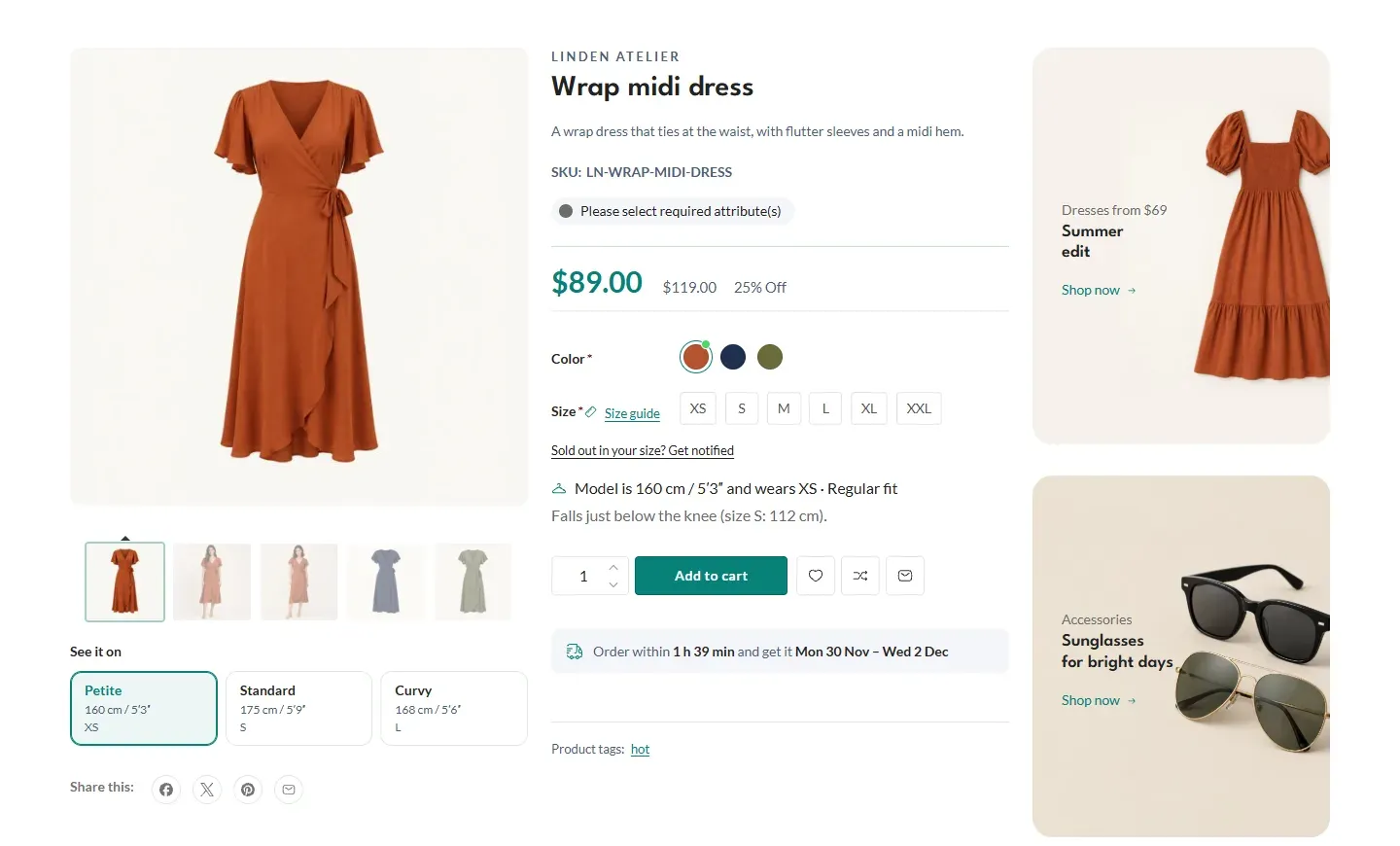
Colour, size and fit next to the button
Shoppers choose a colour from swatches and a size from buttons that show what is left. The size guide, the model’s height and size, and the delivery date sit right beside add to cart.
- Swatches change the main picture
- Sold-out sizes are marked
- “See it on” switches between models of different heights
Linden on nopCommerce 5.00
02 / 07
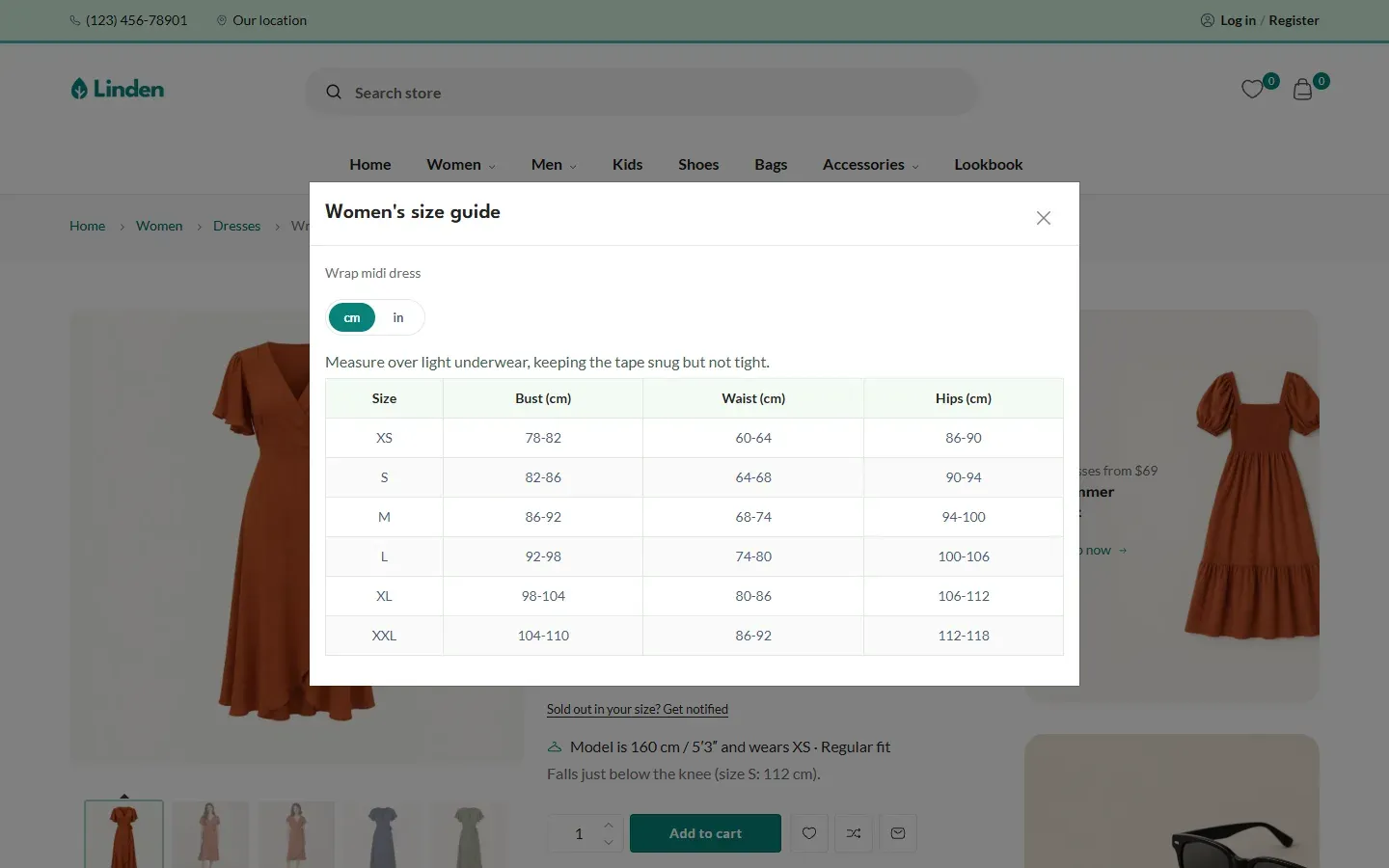
The right size chart, on the product page
Keep one chart per category or brand and attach it to many products. It opens over the product page, in centimetres or inches, so shoppers never leave to check their size.
- Charts per category or brand
- Centimetre and inch switch
- A size guide page for the footer too
Linden on nopCommerce 5.00
03 / 07
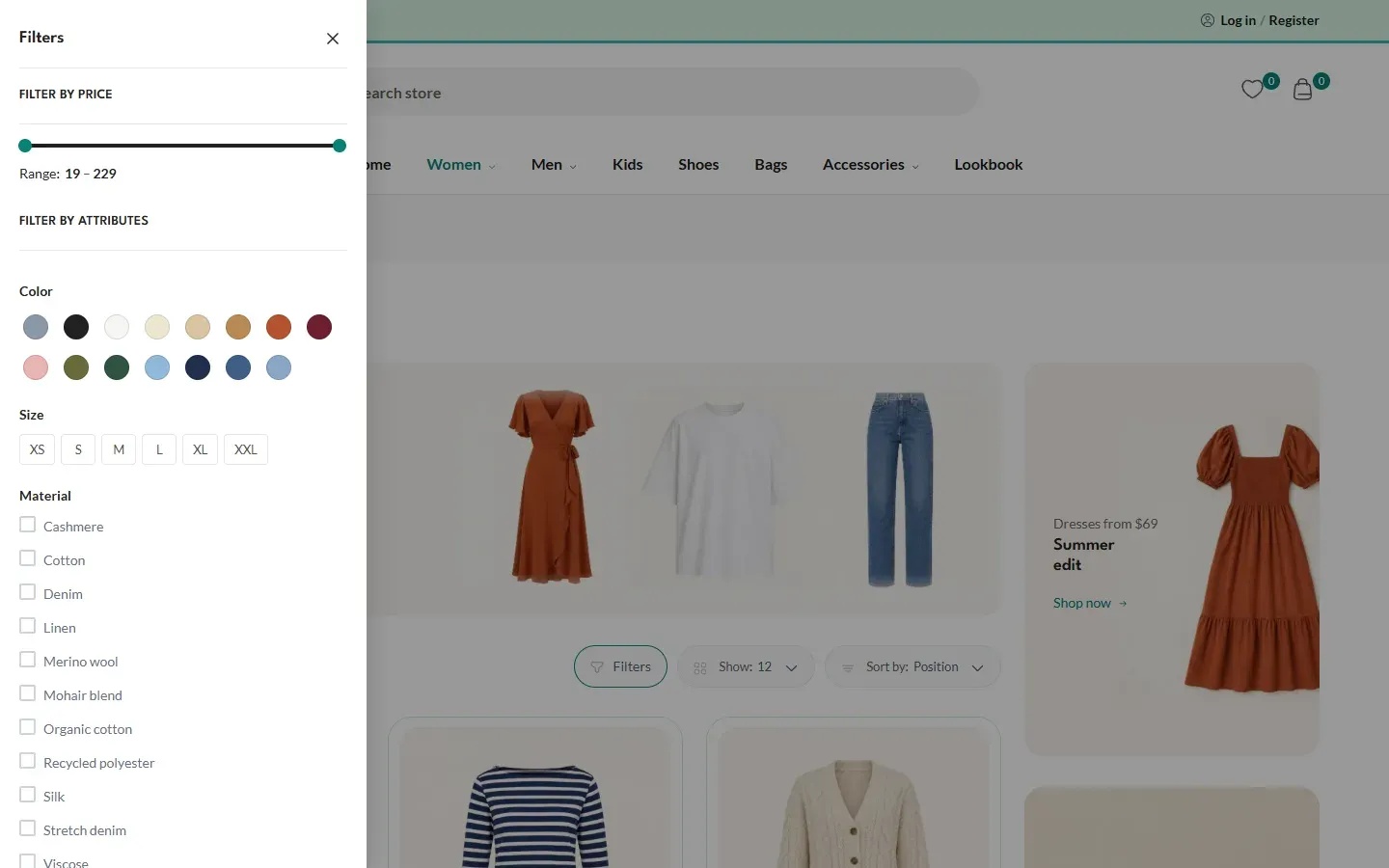
Filter by colour and size the way shoppers do
Colours show as swatches and sizes as chips, next to the price slider and materials. Chosen filters appear as chips above the products, each with its own remove button.
- Colour swatches and size chips
- Several filters at once
- Works with nopCommerce’s own specification attributes
Linden on nopCommerce 5.00
04 / 07
Every colour at a glance
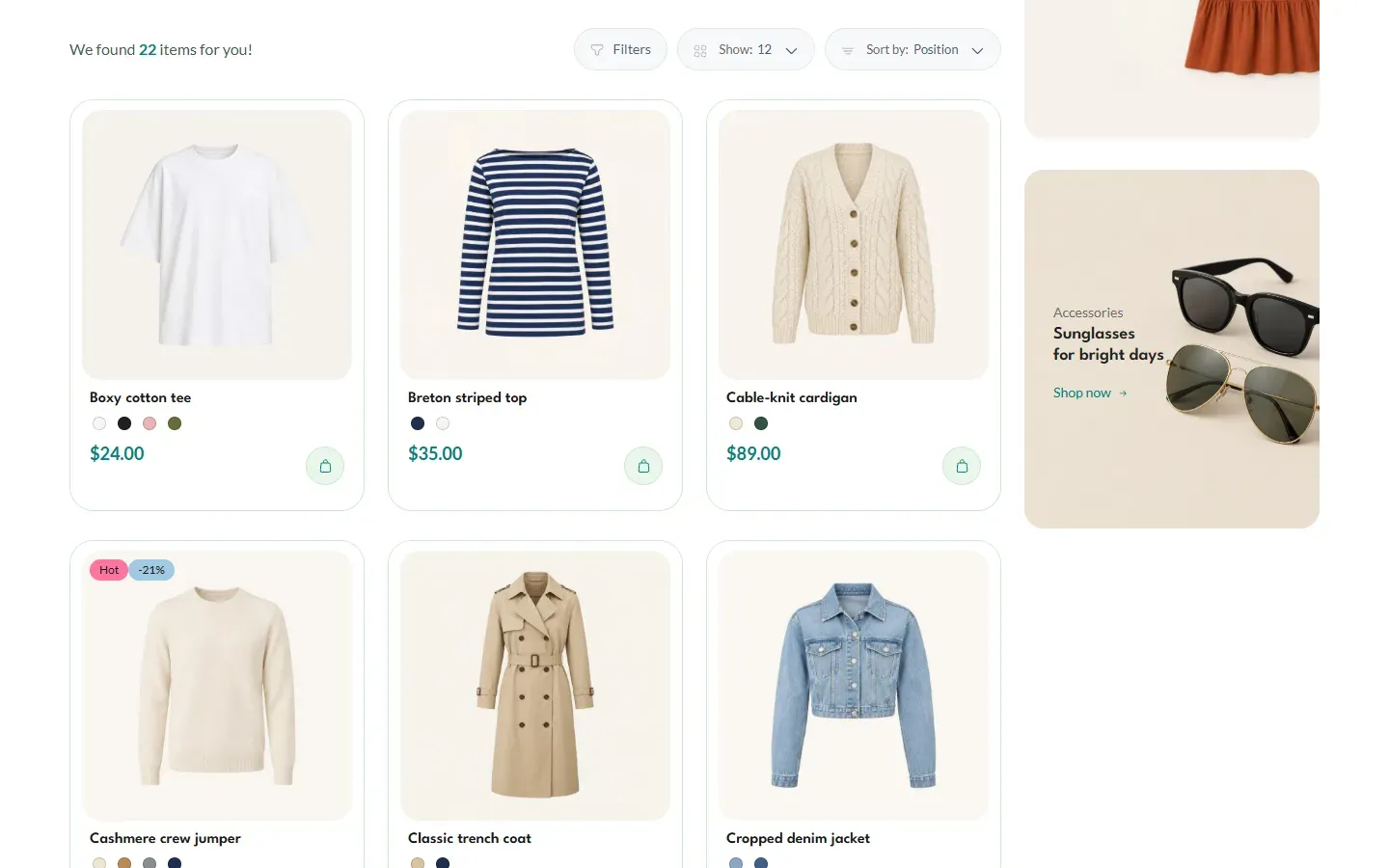
Product cards show the colours a garment comes in, Hot, New and sale badges, and a quick add button. Category pages can have a banner and side banners of their own.
- Colour dots on every card
- Quick view and quick add
- Grid with or without a sidebar
Linden on nopCommerce 5.00
05 / 07
Sell the outfit, not only the item
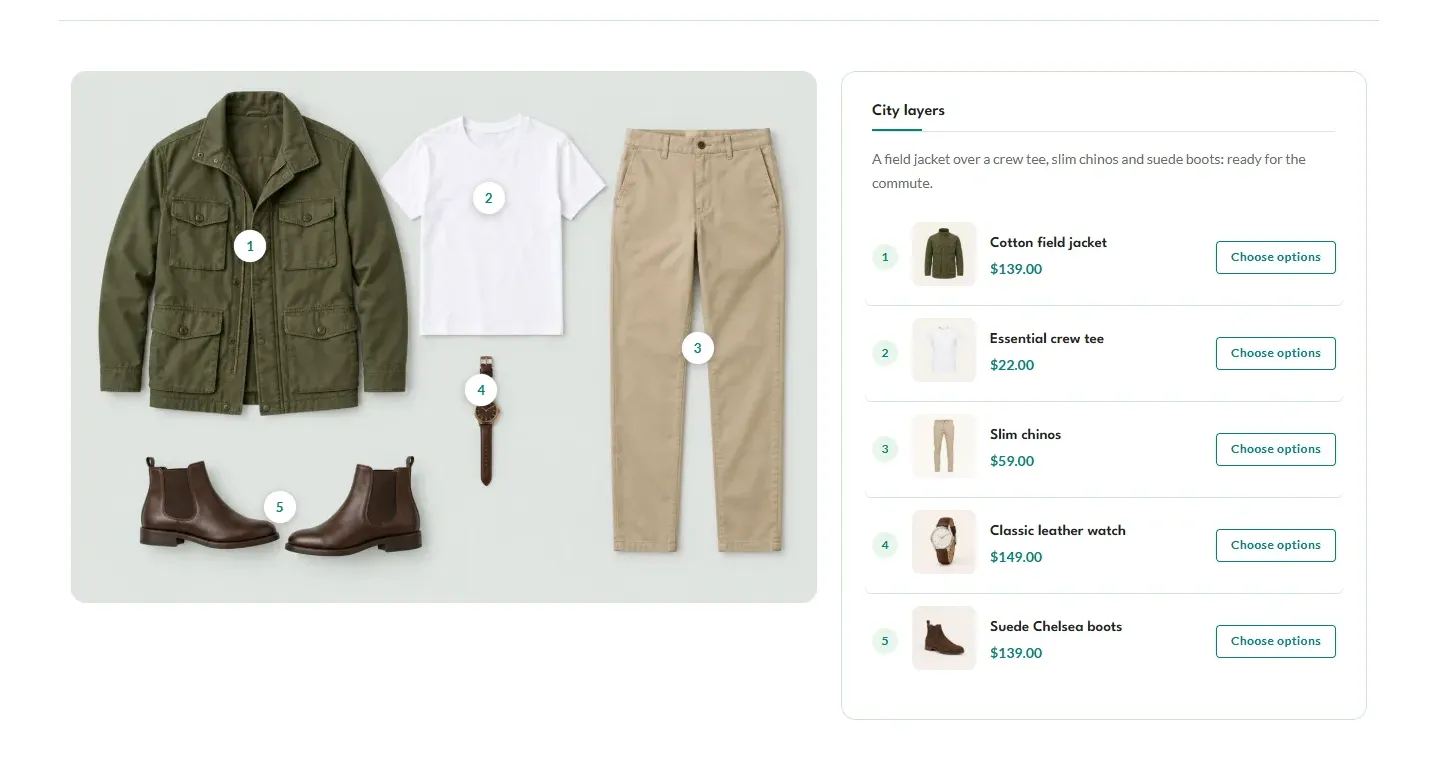
Click a picture in the admin area to place numbered spots and pick their products. Looks appear on the homepage and on a lookbook page, and shoppers can add the whole outfit at once.
- Hotspot editor in the admin area
- Lookbook page and homepage section
- “Add all to cart” for items without options
Linden on nopCommerce 5.00
06 / 07
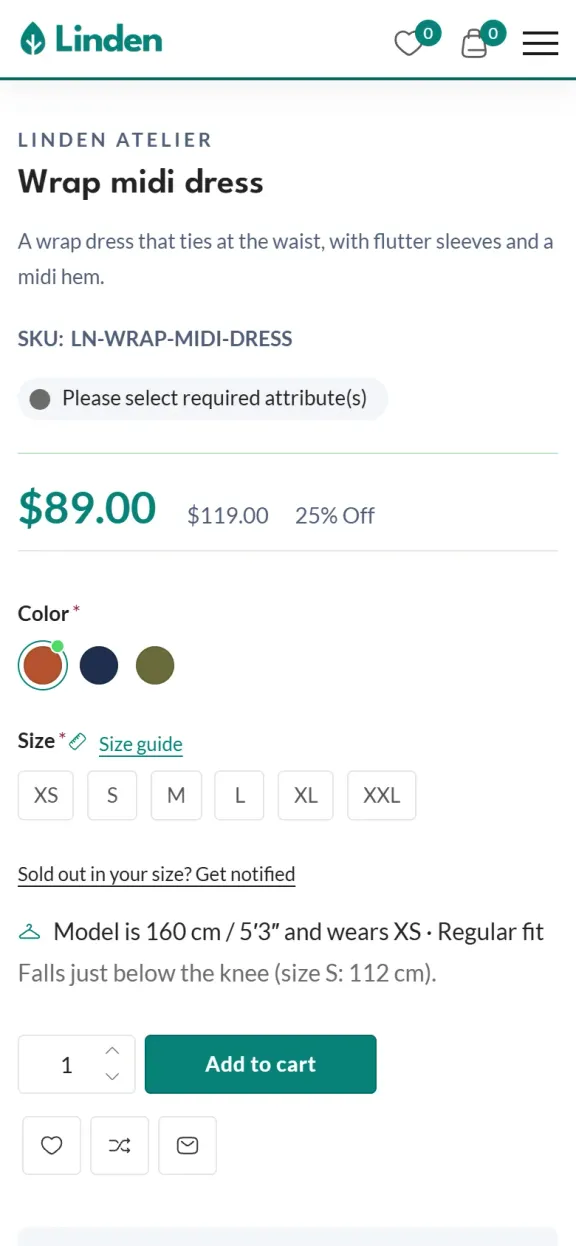
Built for thumbs
Most fashion traffic is on phones. Swatches and size buttons are large enough to tap, and an add to cart bar stays at the bottom of the screen once the shopper scrolls past the button.
- Fixed add to cart bar
- Filters in a side panel
- No sideways scrolling at 375 px
07 / 07
A new season without a developer
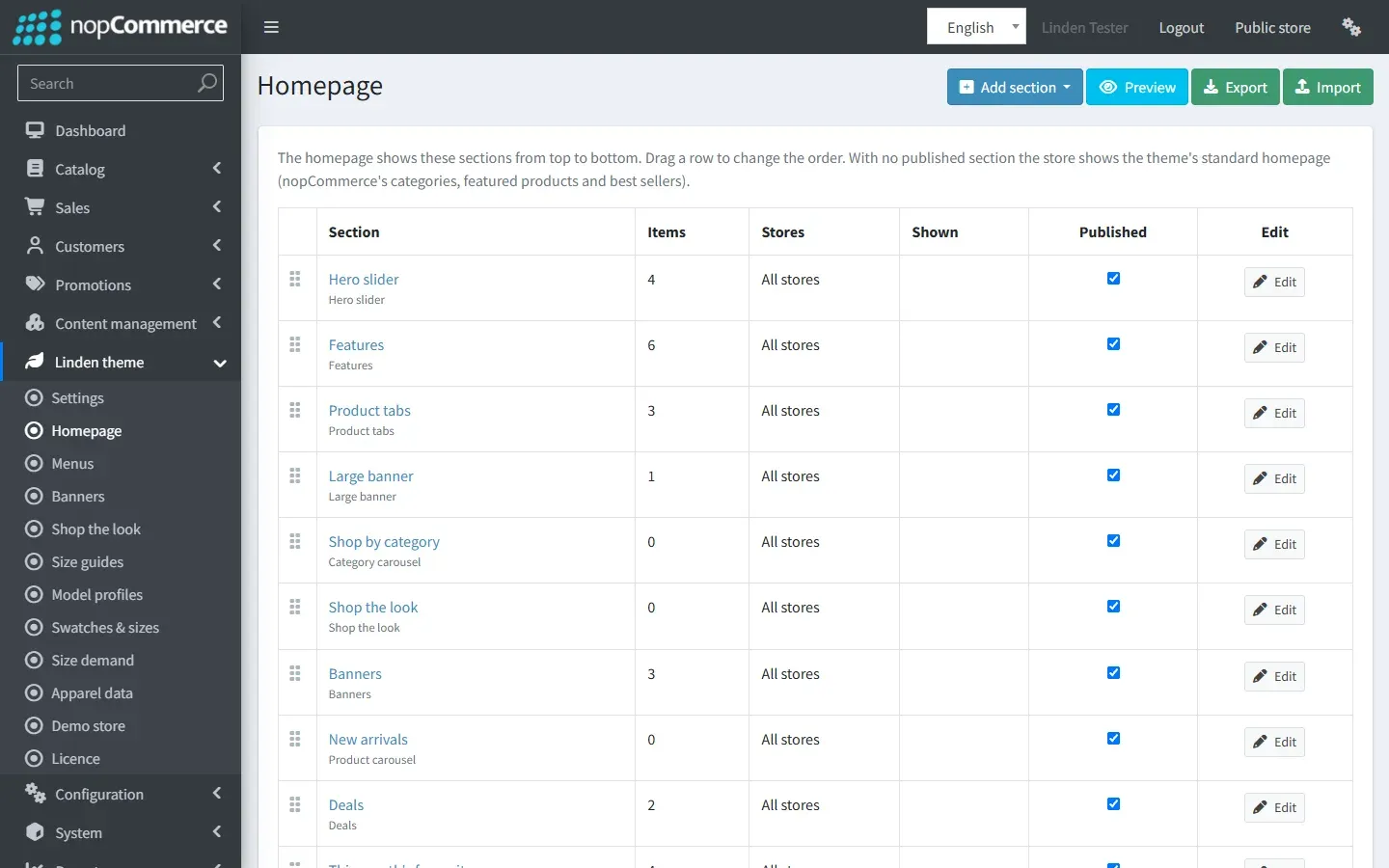
The homepage is a list of sections you add, edit, drag into order and publish per store, from hero slides to product tabs, banners, deals, Shop the look and blog posts.
- 17 section types
- Preview before you publish
- Export and import a homepage
nopCommerce admin
The product pictures in the demo catalog are generated for the demo; your own photos replace them.
Features
Everything in the package
The theme and its companion plugin, installed from one ZIP through nopCommerce’s own Upload plugin or theme. Every feature has its own setting.
Product and fit
- Colour swatches and size buttons, with stock per size
- Size guides per category or brand, in centimetres and inches
- Size alerts by email, and a size demand report
- “My size”: shoppers save their size once, and it is picked for them on every product
- Model information and a “See it on” switch between models
- Fit meter from customer reviews, from “runs small” to “runs large”
- Delivery estimate and a free-shipping bar
- “Complete the look” suggestions under the product
Catalog and outfits
- Colour dots and badges on product cards, quick view and quick add
- Filters with colour swatches, size chips and materials
- Shop the look with a hotspot editor: click the picture, pick the product
- Lookbook page and “Add all to cart”
- Drop-down and mega menus, and a banner library
- Fixed add to cart bar on phones
Store, admin and Google
- Homepage builder with 17 section types, per store
- Colours, fonts and six ready-made palettes, with a contrast check
- Apparel data for Google: product groups, colour, size, gender, age group, material
- A fashion demo catalog you can load and remove from the admin area
- WCAG 2.2 AA, right-to-left languages, every text translatable
- nopCommerce 4.70, 4.80, 4.90 and 5.00 from one package
Pricing
One price. Every feature.
A lifetime licence with 12 months of updates and support. No subscription, no per-feature pricing.
Linden
Loading priceone time, per store
- Lifetime licence for your store’s domain, plus staging and development copies
- The theme and its companion plugin, for nopCommerce 4.70, 4.80, 4.90 and 5.00
- 12 months of updates and support
- Optional: another 12 months of updates and support, arranged by email
- Your version keeps working if you don’t renew
Purchasing opens soon
Online checkout isn’t open yet. Email us for a demo, or to be told the day it opens.
How the licence works
- 1
Pay once
One payment buys a lifetime licence for your store’s domain. Local, staging and dev copies never need a key, so you can build the store first.
- 2
12 months of updates and support
Every release in that time, including new nopCommerce versions, and answers from the team that built it.
- 3
Renew only if you want to
After 12 months nothing stops working. Renew for another 12 months by email whenever you want newer versions and support again.
Not included
- Installation and set-up (we can do it for you)
- Customisation and new features (ask us for a quote)
- Product photos: the demo catalog uses generated pictures
- Hosting and your nopCommerce server
- A nopCommerce copyright-removal licence
Compatibility
Check the fit before you buy
The practical details for your store and team.
- nopCommerce
- 4.70, 4.80, 4.90 and 5.00. One download holds a build for each; nopCommerce’s “Upload plugin or theme” installs the one that matches your store, and the same file updates it later.
- Your store
- No nopCommerce files are changed. The companion plugin adds its own tables and settings, and uninstalling removes them.
- Your catalog
- Uses nopCommerce’s own product attributes, attribute combinations and specification attributes. You choose which ones are colours and sizes.
- Languages
- English included. Every text is a locale resource you can translate in admin, and right-to-left languages have their own stylesheet.
- Multi-store
- Colours, fonts and homepage sections are set per store.
- Accessibility
- Built to WCAG 2.2 AA for the theme and its storefront features, with a contrast check on the colours you pick.
- Testing
- Release 1 was installed fresh and as an update on nopCommerce 4.70, 4.80, 4.90 and 5.00 before release.
Questions
Before you buy
Something else to check? Email contact@cartenvo.com.
Which nopCommerce versions does Linden support?
nopCommerce 4.70, 4.80, 4.90 and 5.00. One download holds a build for each, and nopCommerce’s “Upload plugin or theme” installs the one that matches your store. The same file updates Linden later.
What’s in the package?
The Linden theme and its companion plugin, which adds the admin pages (settings, homepage, menus, banners, Shop the look, size guides, model profiles, swatches and sizes, size demand, apparel data, demo store and licence) and the fashion features on the storefront.
Is the licence lifetime or yearly?
Lifetime, for your store’s domain, with 12 months of updates and support. After that nothing stops working: you keep the last version you received, and can renew for newer versions and support whenever you need them.
What works without a licence key?
Local and staging addresses, such as localhost or a staging or dev subdomain, need no key, so you can build the store first. On a live address without a valid key the theme still works with its default colours and nopCommerce’s homepage, and the store’s colours and fonts, the homepage builder and the fashion features are turned off for shoppers until a key is saved. Nothing you set up is deleted.
Does the licence check send any data?
The key is checked on your own server. From 60 days after purchase, about once a month, the store asks cartenvo.com whether the licence is still active, sending the licence ID, the store’s address and the plugin and nopCommerce versions. Nothing about your customers or orders is sent, and local or staging copies never call.
Do I need to set up sizes and colours in a special way?
No. Linden uses nopCommerce’s own product attributes and attribute combinations. Choose on the Swatches & sizes page which attributes are colours and which are sizes, and Linden shows them as swatches and size buttons.
Can I try it on my own catalog?
Yes. Install it on a local or staging copy of your store, where no key is needed, or email us and we’ll show it to you with a catalog like yours. The demo store page loads a complete fashion catalog to try it with, and removes it again.
Can you customise it for us?
Yes. We built it, so we can change the design, add sections or connect it to your systems. Customisations are made on top of Linden, so you keep receiving updates.
See Linden with a catalog like yours.
Tell us your nopCommerce version and what you sell, and we’ll show you the store your shoppers would get.