Skip to content
  • Plugin
  • Paid

ChatGPT Ads pixel, Conversions API and product feed for nopCommerce

Know which ChatGPT ads sell, and show ChatGPT the products you have today. The plugin installs OpenAI’s Measurement Pixel, sends every order and lead from your server through the Conversions API as well, keeps the ChatGPT click ID (oppref) for attribution, and uploads a complete product feed every day, with price and stock updates in between. Set up in five steps, with no code.

nopCommerce
4.70–5.00
Price
Loading price
Licence
Lifetime, per store
Set up
Five steps, no code

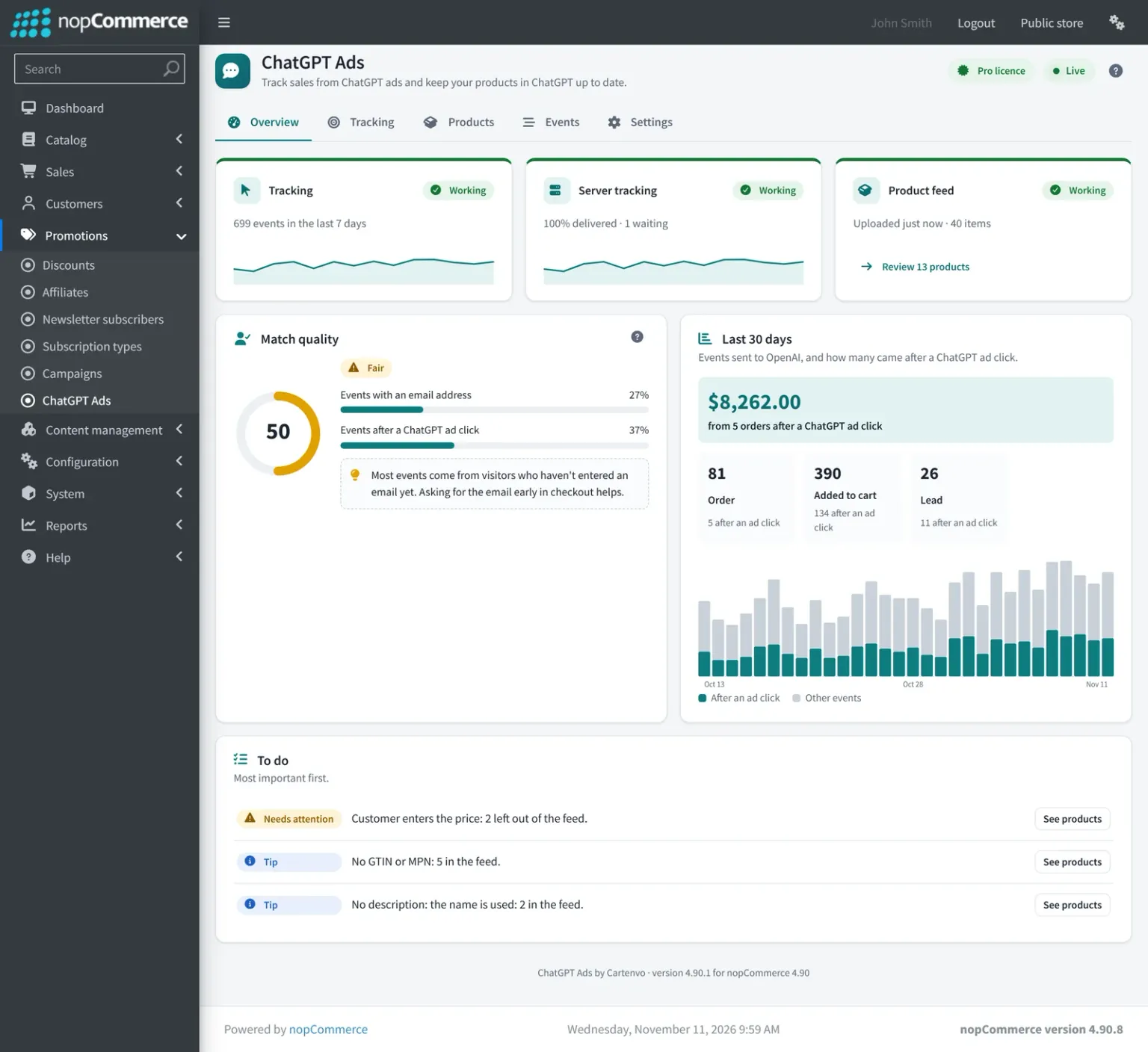
Promotions → ChatGPT Ads → Overview

ChatGPT Ads overview in nopCommerce admin: tracking, server tracking and product feed all marked Working, a match quality score of 50, 8,262 dollars from 5 orders after a ChatGPT ad click in the last 30 days, a daily chart of events after an ad click, and a to-do list such as “Customer enters the price: 2 left out of the feed”

ChatGPT Ads plugin

Loading priceone-time

Lifetime licence for one store’s domains, with 12 months of updates and support.

Purchasing opens soon

The plugin is finished and tested on nopCommerce 4.70, 4.80, 4.90 and 5.00. Online checkout isn’t open yet. Email us and we’ll send it to you as soon as it is.

  • Pixel and Conversions API
  • Daily feed with 15-minute updates
  • Lifetime licence, checked offline

New to ChatGPT ads tracking? Read how the pixel, Conversions API and oppref work together, and what OpenAI expects in a ChatGPT product feed.

Selling on Google Shopping too? The free Merchant Center Feed plugin sends the same catalog to Google.

Why store owners use it

Ads you can measure, and a catalog ChatGPT can trust.

ChatGPT ads learn from the sales they can see and show the products in your feed. This plugin takes care of both from inside nopCommerce.

  • See which ads make money

    The overview shows orders and revenue that came after a ChatGPT ad click, next to everything else your store sent. You stop guessing whether the campaign pays for itself.

  • Don’t lose sales to ad blockers

    Every order is sent twice: by the pixel in the browser and by your server. Both copies share one event ID, so OpenAI counts it once, and a blocked script or a closed tab doesn’t hide the sale.

  • Give the ads better signals

    Ads learn from the conversions they see. Product views, carts, checkouts, orders and leads, with hashed email and the ChatGPT click ID, let OpenAI match more sales to the people who saw the ad.

  • Show today’s price and stock

    A complete product feed is built every night and uploaded to OpenAI. Price and stock changes go out every 15 minutes in between, so shoppers don’t click through to a price that changed or an item that sold out.

  • Count leads, not only orders

    Phone and email clicks, Contact Us, newsletter and HubSpot forms, buttons and thank-you pages can count as conversions, without code. Useful for B2B stores and anything sold by quote.

  • Fix what keeps products out

    Every product left out of the feed says why: no brand, call for price, no picture. The fix is one click away, and the product page in admin shows the same status.

How it works

From an ad click to a counted sale.

  1. Step 1

    A shopper clicks your ad in ChatGPT

    The link carries a click ID called oppref. With consent, the plugin keeps it for 30 days in the same cookie the pixel uses, so the sale can be tied back to the ad.

  2. Step 2

    They shop in your nopCommerce store

    Product views, carts and checkout are sent as they happen, by the pixel and, if you choose, by your server too.

  3. Step 3

    They place an order

    The order goes to OpenAI from the browser and the server with one shared ID. Ads Manager counts it once.

  4. Step 4

    You see what the ad earned

    Ads Manager reports the conversion, and the plugin’s overview shows revenue from ChatGPT ad clicks in your own admin.

Inside the plugin

Clear about what’s happening, at every step.

Real screens from a nopCommerce 4.90 store with the sample catalogue.

Set up

Five short steps, then Go live

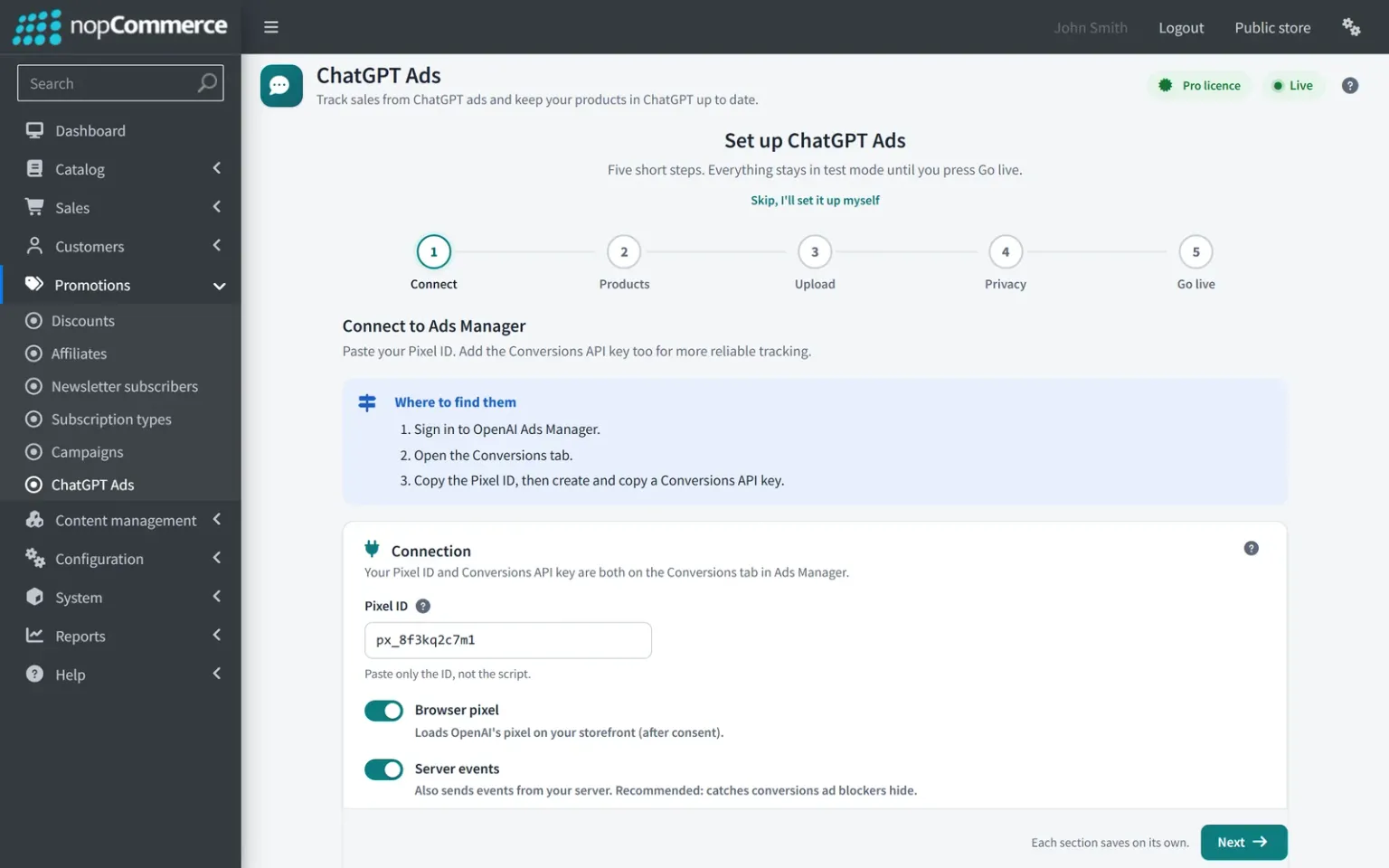
Paste the Pixel ID and Conversions API key from OpenAI Ads Manager, choose which products to send, add the SFTP details, pick a consent mode and press Go live. Each step saves on its own and checks its own work.

  • Test connection sends a check-only event
  • Everything stays in test mode until you choose Go live
  • Test mode tracks your own visits as a test visitor, on the live store

Promotions → ChatGPT Ads → Setup guide

Five-step setup guide (Connect, Products, Upload, Privacy, Go live) on the Connect step, with where to find the Pixel ID and Conversions API key in OpenAI Ads Manager and switches for the browser pixel and server events

Tracking

Works with your theme and checkout

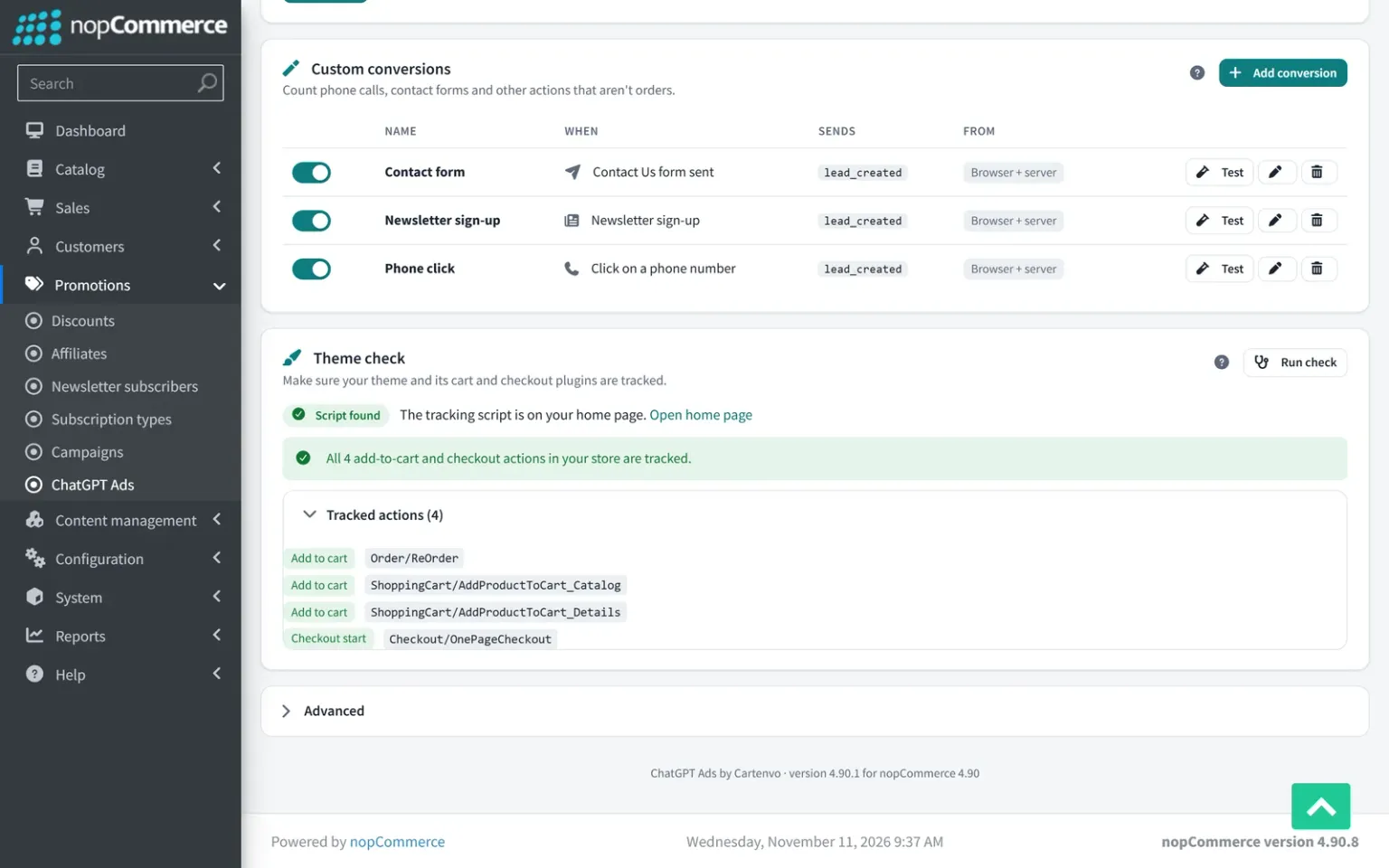
AJAX carts, one-page checkout and popular paid themes are covered out of the box. Theme check makes sure the script is on your home page, lists every add-to-cart and checkout action your theme or plugins add, and tracks any that were missed with one click.

  • Product viewed, added to cart, checkout started, order, registration and lead
  • An order counts when it’s placed, or only once it’s paid
  • Custom conversions for phone, email, forms, buttons and pages

ChatGPT Ads → Tracking

Custom conversions for the contact form, newsletter sign-up and phone clicks, sent from browser and server, and a Theme check that found the tracking script and all 4 add-to-cart and checkout actions in the store tracked

Product feed

See exactly what ChatGPT receives

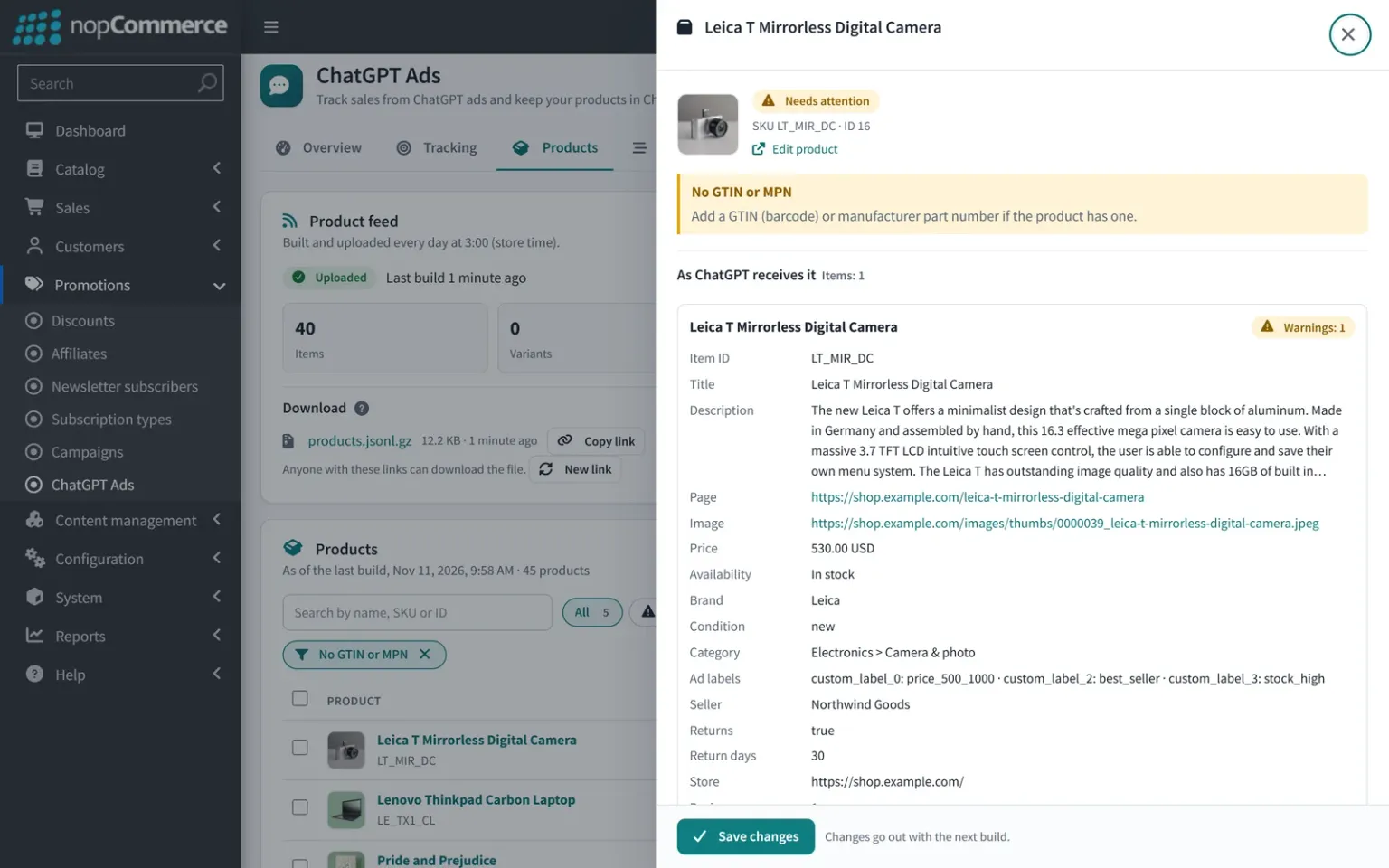
The feed holds variants, nopCommerce’s own prices and discounts, brand, GTIN and MPN, categories, extra pictures, colour, size, material, shipping, returns and reviews. Open any product to see its item as OpenAI gets it, and filter by problem.

  • Five ad labels: price band, margin, best seller, stock level or your own
  • Uploaded to OpenAI by SFTP every day, plus a private download link for your own checks
  • Products can be left out one by one, from the product page

ChatGPT Ads → Products

Products tab filtered by “No GTIN or MPN”, with the Leica T camera open to show exactly what ChatGPT receives: item ID, title, description, page and image links, price, availability, brand, category, ad labels such as price_500_1000 and best_seller, seller and returns

Events

Every event, in plain English

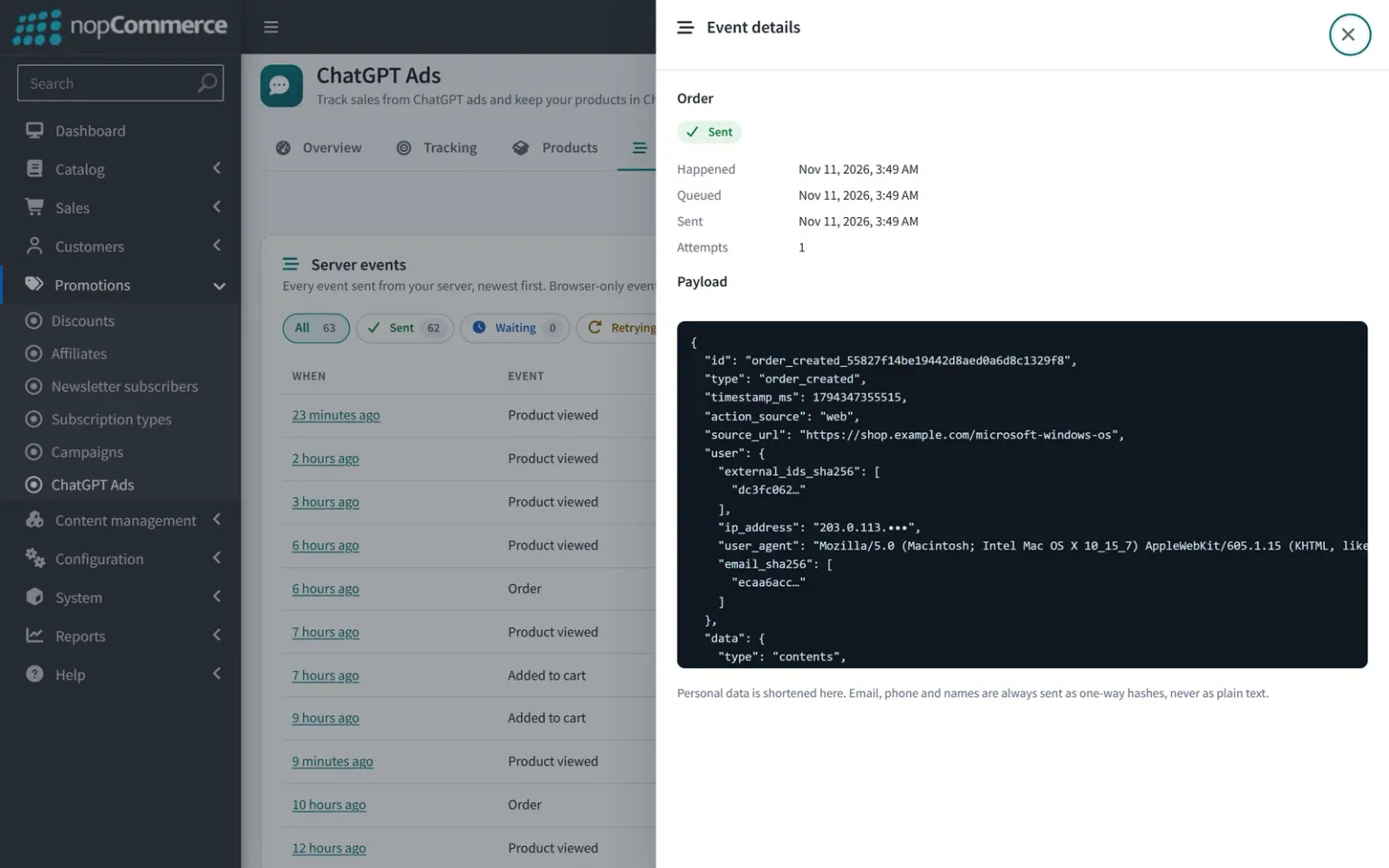
The events list shows each server event with what was sent and whether OpenAI took it. Errors say what to do, such as “The server key was rejected. Copy it again from Ads Manager.” Events wait in the database and are retried, so a restart or an outage doesn’t lose them.

  • Email, phone and names leave your server only as one-way hashes
  • A send test for every custom conversion
  • Match quality score with tips to raise it

ChatGPT Ads → Events

Server events list with an order event open: sent on the first attempt, and the payload sent to OpenAI with the email and customer ID as one-way SHA-256 hashes

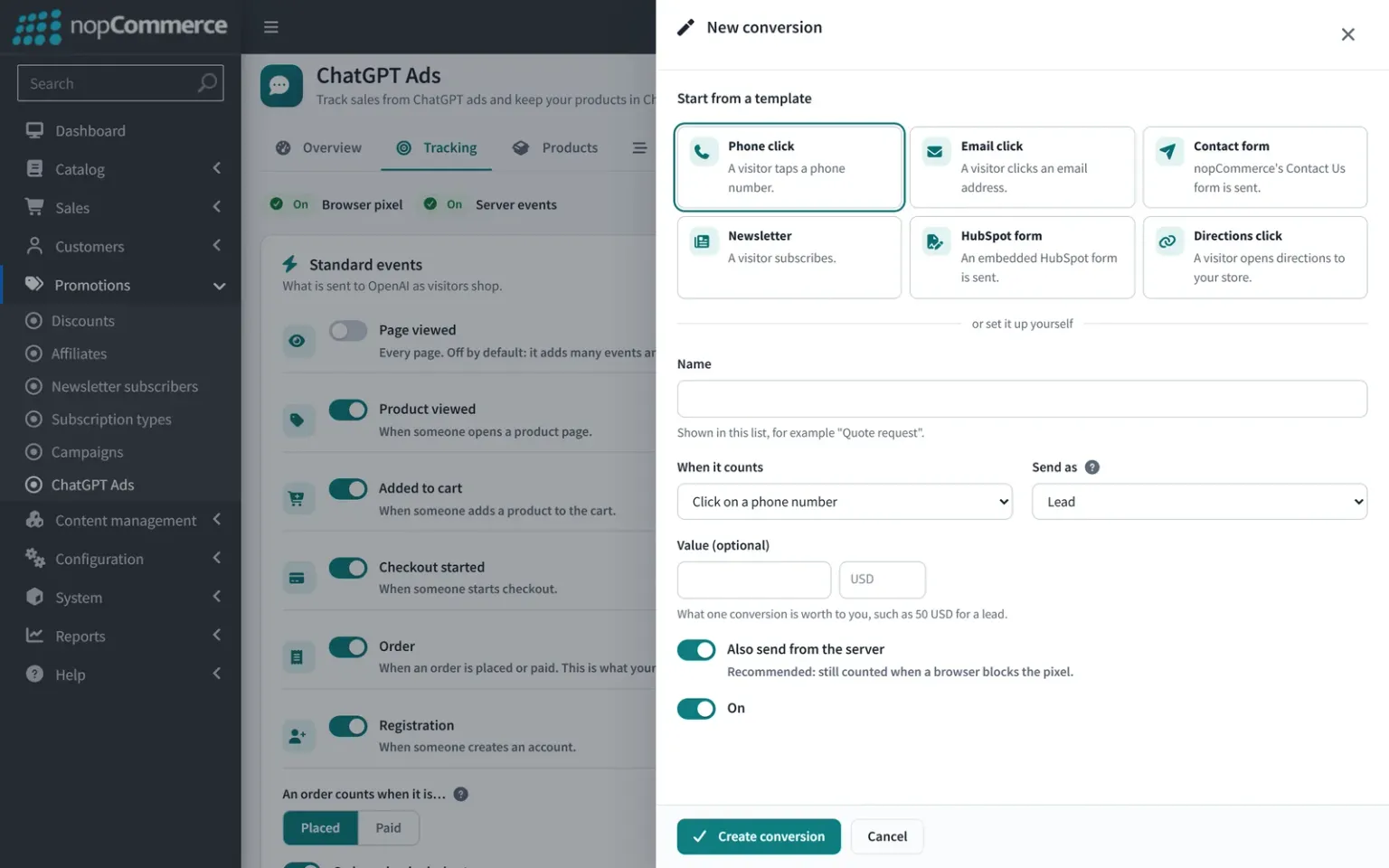
ChatGPT Ads → Tracking → New conversion

New conversion panel with templates for phone click, email click, Contact Us form, newsletter, HubSpot form and directions click, sent as a lead with an optional value and also sent from the server
Custom conversions start from a template: phone and email clicks, Contact Us, newsletter, HubSpot forms or directions.

Catalog → Products → Edit

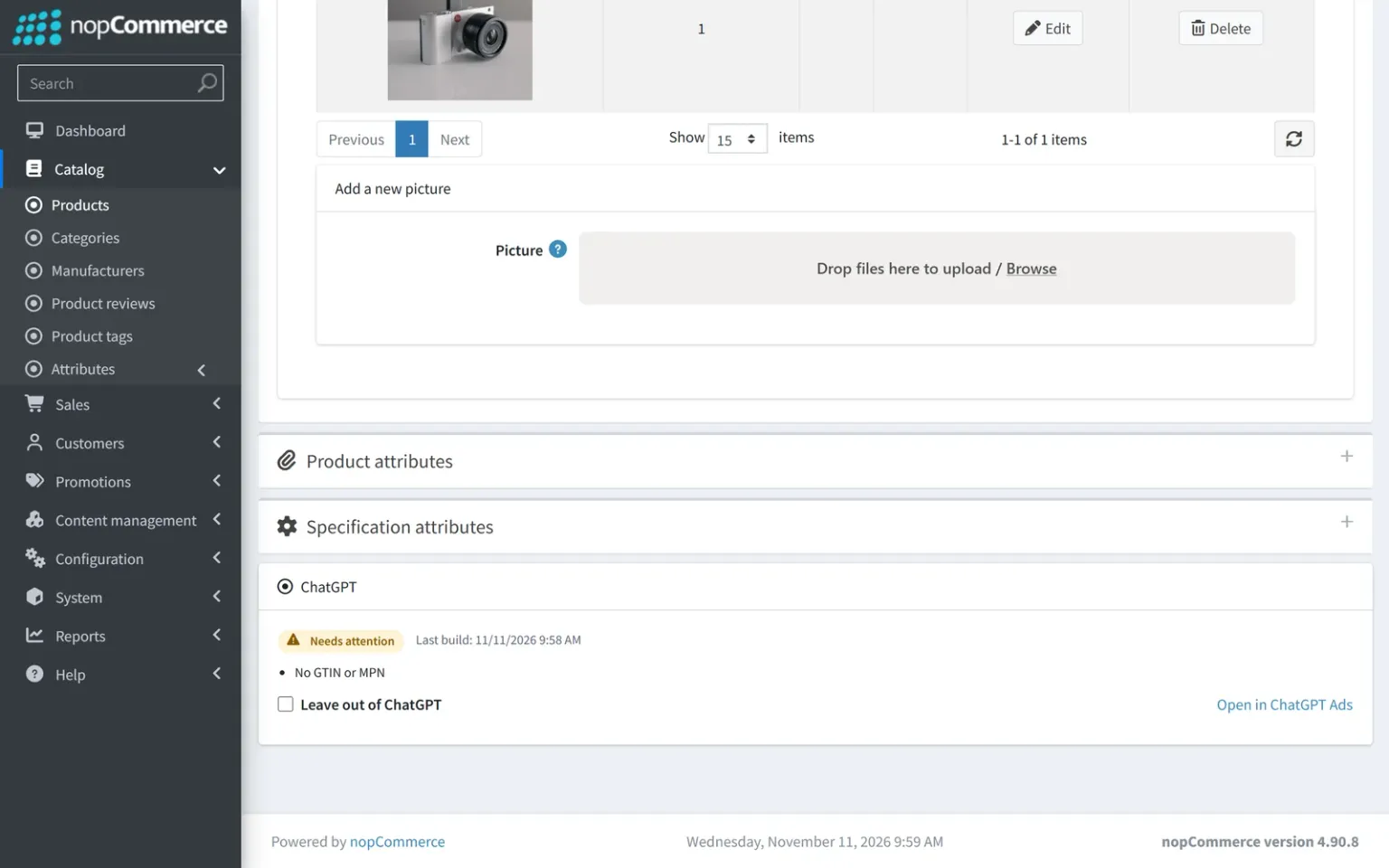
ChatGPT card on the nopCommerce product edit page: Needs attention, last build time, the reason “No GTIN or MPN”, a “Leave out of ChatGPT” box and a link to the plugin
Each product page in admin shows its ChatGPT status, and a box to leave it out of the feed.

Moving from another plugin

Bring your settings across in one click

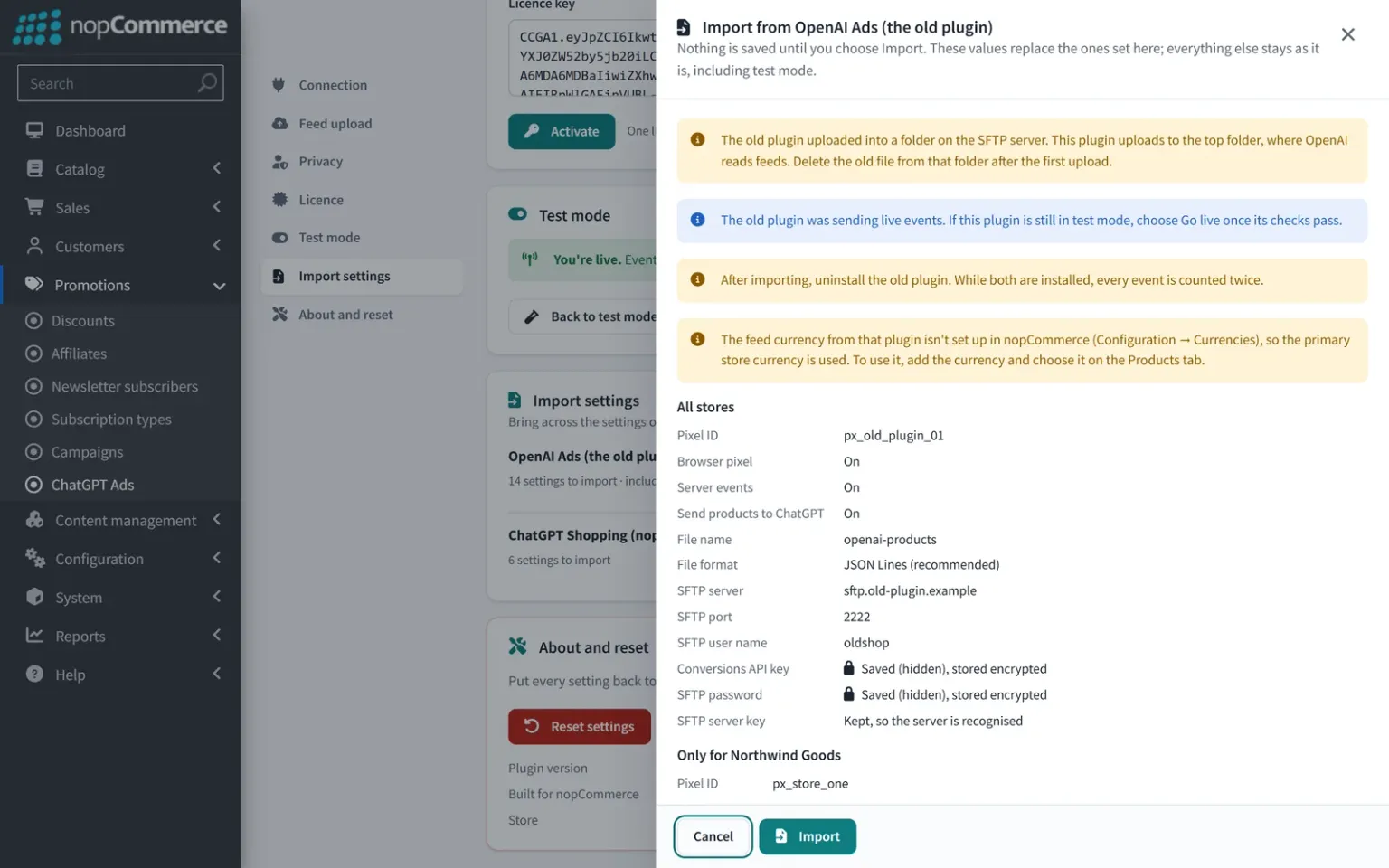
Already using nopCommerce’s ChatGPT Shopping plugin or the earlier OpenAI Ads plugin? The setup guide offers to import the Pixel ID, Conversions API key, feed settings and SFTP details. You see every value before anything is saved, secrets stay encrypted, and the overview warns you if both plugins would count the same order.

ChatGPT Ads → Settings → Import settings

Import settings panel bringing the Pixel ID, Conversions API key, feed and SFTP settings across from an earlier plugin, with notes on what changes and secrets kept encrypted

How the licence works

  • One licence covers one store’s domains and their subdomains. “www.” is ignored.
  • Checked offline inside nopCommerce. The plugin never calls home.
  • Works without a licence on localhost, 127.0.0.1 and .test or .local addresses, so you can set it up on a copy of your store.
  • A lifetime licence: pay once. It never expires.
  • Includes 12 months of updates and email support.
  • Multi-store installs with several domains can get one licence that lists them all. Ask us.

Install in four steps

  1. 1 Upload the ZIP in Configuration → Local plugins and restart. One download covers 4.70, 4.80, 4.90 and 5.00; nopCommerce installs the build for your version.
  2. 2 Install ChatGPT Ads – Conversion Tracking & Product Feed and restart again.
  3. 3 Open Promotions → ChatGPT Ads and follow the five-step setup guide.
  4. 4 Add your licence under Settings → Licence, check the overview and choose Go live.

Works in nopCommerce’s light and dark admin themes, with multi-store and store-specific settings.

Frequently asked questions

What do I need to use it?

nopCommerce 4.70, 4.80, 4.90 or 5.00, and an OpenAI Ads Manager account. From Ads Manager you need the Pixel ID and a Conversions API key, and for the product feed the SFTP details OpenAI gives you.

How does it know a sale came from a ChatGPT ad?

When someone clicks a ChatGPT ad, the link to your store carries a click ID called oppref. OpenAI’s pixel keeps it in a cookie, but the Conversions API doesn’t pick it up by itself, so the plugin keeps it too and adds it to every server event for that visitor. With a hashed email as well, OpenAI can match the order to the ad.

Why send events from the server as well as the pixel?

Ad blockers, privacy settings and closed tabs stop some browser events. The server sends the same events directly to OpenAI’s Conversions API, so those sales still count. Both copies share one ID, so nothing is counted twice.

Does it slow my store down?

No. The storefront gets one small script, about 4 KB gzipped, and server events are sent in the background. The feed is built in the background too, at night by default.

What about privacy and cookie consent?

You choose one of three consent modes, including nopCommerce’s own cookie notice and Google Consent Mode. Email addresses and other customer data are hashed one way before they leave your store, and you can stop sending customer data altogether.

Can I test it before it goes live?

Yes. Everything stays in test mode until you choose Go live, and test mode tracks your own visits on the live store as a test visitor. On a development copy of the store (localhost, .test or .local) everything works without a licence.

Does it replace nopCommerce’s ChatGPT Shopping plugin?

Yes. It adds conversion tracking, SFTP upload, variants and more feed fields. One click imports that plugin’s settings, or those of the earlier OpenAI Ads plugin, and shows every value before anything is saved.

Does it work with multi-store?

Yes. Settings can be shared or set per store, and each store gets its own feed. One licence covers the domains named in it, so a multi-store install with several domains needs a licence that lists them all.

Is the licence a subscription?

No. You pay once and the licence never expires. It includes 12 months of updates and email support.

ChatGPT and OpenAI are trademarks of OpenAI. This plugin is made by Cartenvo and is not affiliated with or endorsed by OpenAI.
Want ChatGPT Ads on your store?

Purchasing opens soon, with a one-time price for a lifetime licence. Email us and we’ll send it as soon as it’s ready, or ask us about tracking ChatGPT ads on your store.