Skip to content
  • Plugin
  • Paid

Supplier price lists into nopCommerce, on a schedule

Product Data Exchange Pro fetches each supplier’s file from a URL, FTP, SFTP, a folder or a Google Sheet, reads it in the supplier’s own layout, works out your prices from their costs and imports it through the free plugin’s checks. If a file looks wrong, the run waits for you instead of going live, and any import can be undone. It also sends product files to dealers on a schedule and edits prices in bulk.

nopCommerce
4.70–5.00
Needs
Free plugin, release 50+
Price
Loading price
Licence
Lifetime, per store

Catalog → Product Data Exchange → Supplier feeds

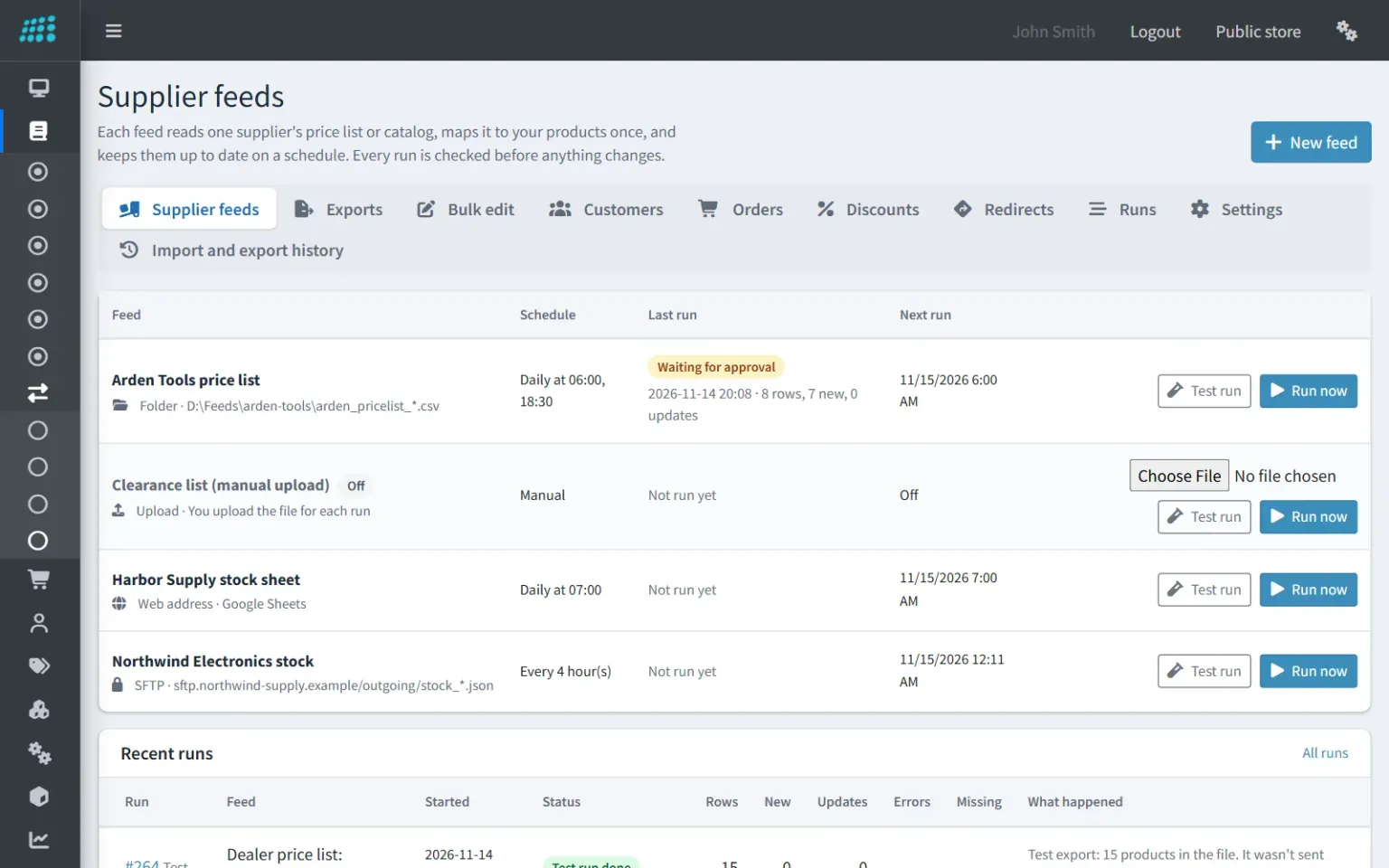
Supplier feeds page in nopCommerce admin, with tabs for exports, bulk edit, customers, orders, discounts, redirects, runs and settings. Four feeds: the Arden Tools price list from a server folder daily at 06:00 and 18:30, waiting for approval; a clearance list uploaded by hand that is switched off; the Harbor Supply stock sheet from Google Sheets daily at 07:00; and Northwind Electronics stock as JSON by SFTP every 4 hours

Product Data Exchange Pro

Loading priceone-time

Lifetime licence for one store’s domains, with 12 months of updates and support.

Purchasing opens soon

Pro is finished and tested on nopCommerce 4.70, 4.80, 4.90 and 5.00. Online checkout isn’t open yet. Email us and we’ll send it to you as soon as it is.

Get the Free Plugin First
  • Feeds from URL, FTP, SFTP, folders or Google Sheets
  • Prices from cost, with a minimum margin
  • Holds bad files, undoes any import
  • Scheduled exports and bulk edits

Moving products between two stores instead? The free plugin does that on its own. Read the product import and export guide.

How a feed works

One line of a supplier’s price list, all the way into your store.

The supplier writes costs with a decimal comma, colours in French and categories their own way. You set the feed up once; every run after that does this to every line.

arden_pricelist_2026-11-13.csv from D:\Feeds\arden-tools, 06:00 daily

ARD-1001;Cordless Drill 18V;5012345100017;Arden;Power Tools > Drills;74,20;24;Bleu;Y

Item No
ARD-1001
Description
Cordless Drill 18V
EAN
5012345100017
Brand
Arden
Category
Power Tools > Drills
Cost
74,20
Qty
24
Colour
Bleu
Active
Y
  1. Matched by SKU

    ARD-1001New product

    Not in your store yet, so it’s created. A known SKU is updated instead, only in the fields you allow.

  2. Priced from cost

    74,20 + 60%118.99

    Your rule, not the supplier’s list price: a markup by price band, category or brand, a minimum margin, and .99 endings.

  3. Values translated

    BleuBlue

    A value map turns the supplier’s words into yours, and Y/N into published or hidden.

  4. Filed where it belongs

    Power Tools > DrillsPower Tools › Drills

    Category paths and brands are found, or created when you allow it.

In your nopCommerce store Published

Cordless Drill 18V

$118.99

Cost $74.20, margin 38%

SKU
ARD-1001
GTIN
5012345100017
Manufacturer
Arden
Category
Power Tools › Drills
Colour
Blue
Stock
24

And the line that doesn’t fit

ARD-9001;Workbench Pro;…;Workshop;on request;2;;Y

“on request” isn’t a cost, so this row is skipped and listed. This feed allows no failed rows, so the whole run waits for approval and the purchasing team gets an email. Nothing changes until someone approves it.

Arden Tools and its price list are made up for this example; the screenshots below use the same file.

Why store owners use it

Supplier data in, without the spreadsheet afternoon.

Stores that resell from distributors spend hours each week copying prices and stock. Pro does it on a schedule and stops when something looks wrong.

  • Stop retyping price lists

    Each supplier’s file is fetched and imported on its own schedule: every few hours, or at set times on chosen days. If the file hasn’t changed since the last import, the run stops early.

  • Keep your margin

    Prices come from the supplier’s cost or price through your rules, with a minimum margin over cost. When a supplier raises a cost, your price follows.

  • A bad file never goes live

    A run waits for you when the file is too short, too many rows can’t be imported, a price jumps more than you allow, or many products would disappear. You get an email and approve or reject it.

  • Deal with discontinued products

    Products the supplier dropped from the file can be hidden, set to zero stock or deleted, but only that supplier’s products: by brand, vendor, category or SKU prefix.

  • Any supplier, any format

    CSV with any separator and encoding, Excel sheets, XML and JSON, plain or zipped, or a Google Sheet. Decimal commas, skipped rows and nested fields are handled, so you don’t clean files by hand.

  • Know what happened, and undo it

    Every run keeps its file, the counts and each row’s result, with emails when a run is held or fails and a signed webhook for your own systems. A whole import can be undone for 30 days.

Where the files come from

  • URLBasic sign-in or an API key header
  • FTP and FTPSNewest file matching a mask
  • SFTPPassword or private key, pinned host key
  • Server folderWhere your ERP or PIM exports
  • Google SheetsShared by link, or private with a key
  • UploadA file you choose for each run

Inside the plugin

Set up a supplier once. Check it any time.

Real screens from Pro release 4 on a nopCommerce 4.90 store with the sample catalogue and the Arden Tools feed.

Mapping

Point each column at a field once

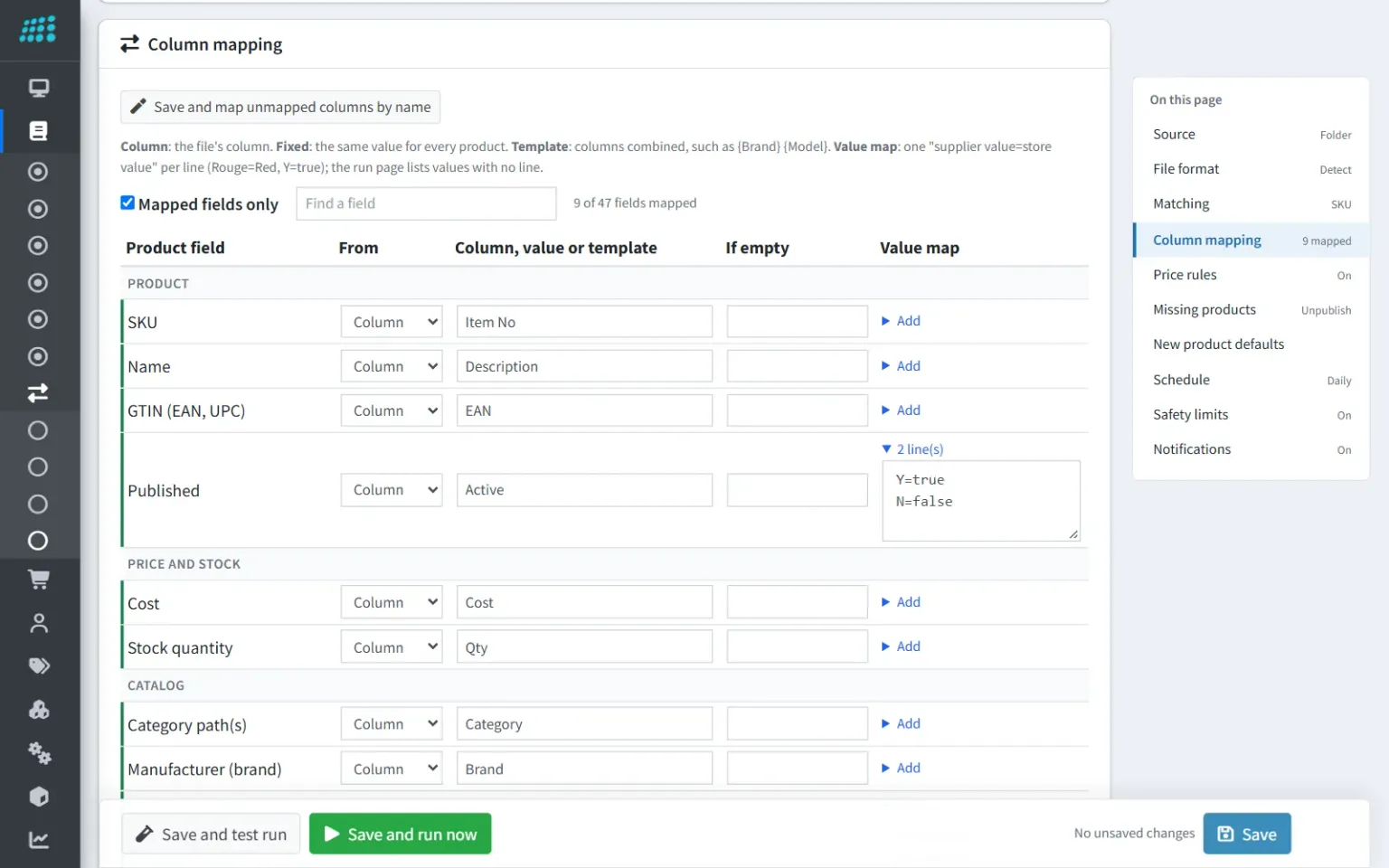
Pick the supplier’s column for each product field, or use fixed text or a template such as {Brand} {Model}. Add a default for empty cells and a value map for the supplier’s words. Specifications, category paths and picture URLs are fields like any other.

  • Read the file once and choose from its real column names
  • Filter the list to mapped fields, or search it
  • Existing products can be limited to the fields you name, such as price and stock

Supplier feeds → Arden Tools price list → Mapping

Feed editor on the Column mapping section, filtered to the 9 of 47 mapped fields: supplier columns Item No, Description, EAN, Active, Cost, Qty, Category and Brand mapped to SKU, name, GTIN, published (with the value map Y=true, N=false), cost, stock, category path and manufacturer, with a section index on the right and Save, test run and run buttons at the bottom

Prices

Your prices, worked out for you

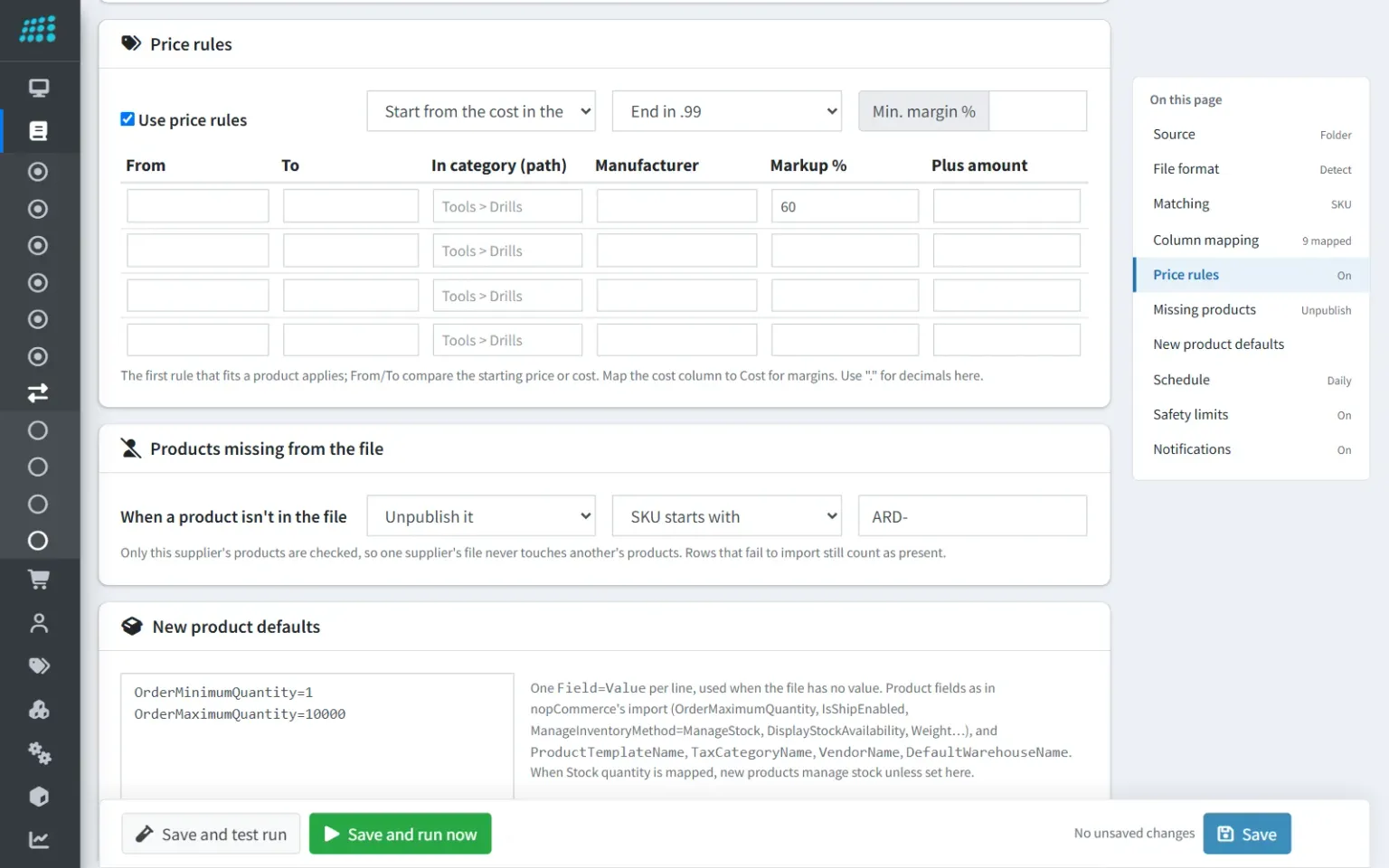
Base the price on the supplier’s cost or their price, then apply the first rule that fits: by price band, category or brand, as a percentage and an amount. A minimum margin over cost catches the rest, and prices can end in .99, .95, .90 or whole numbers.

  • Product cost is kept up to date as well
  • Test runs show the old and new price of each product
  • A price change over your limit holds the run for approval

Supplier feeds → Arden Tools price list → Prices

Feed editor on the Price rules section: start from the cost in the file, end prices in .99, a minimum margin, and rules by price band, category path and manufacturer with a markup percentage and amount, here 60 percent. Below, products missing from the file are unpublished when their SKU starts with ARD-

Test run

See the result before anything changes

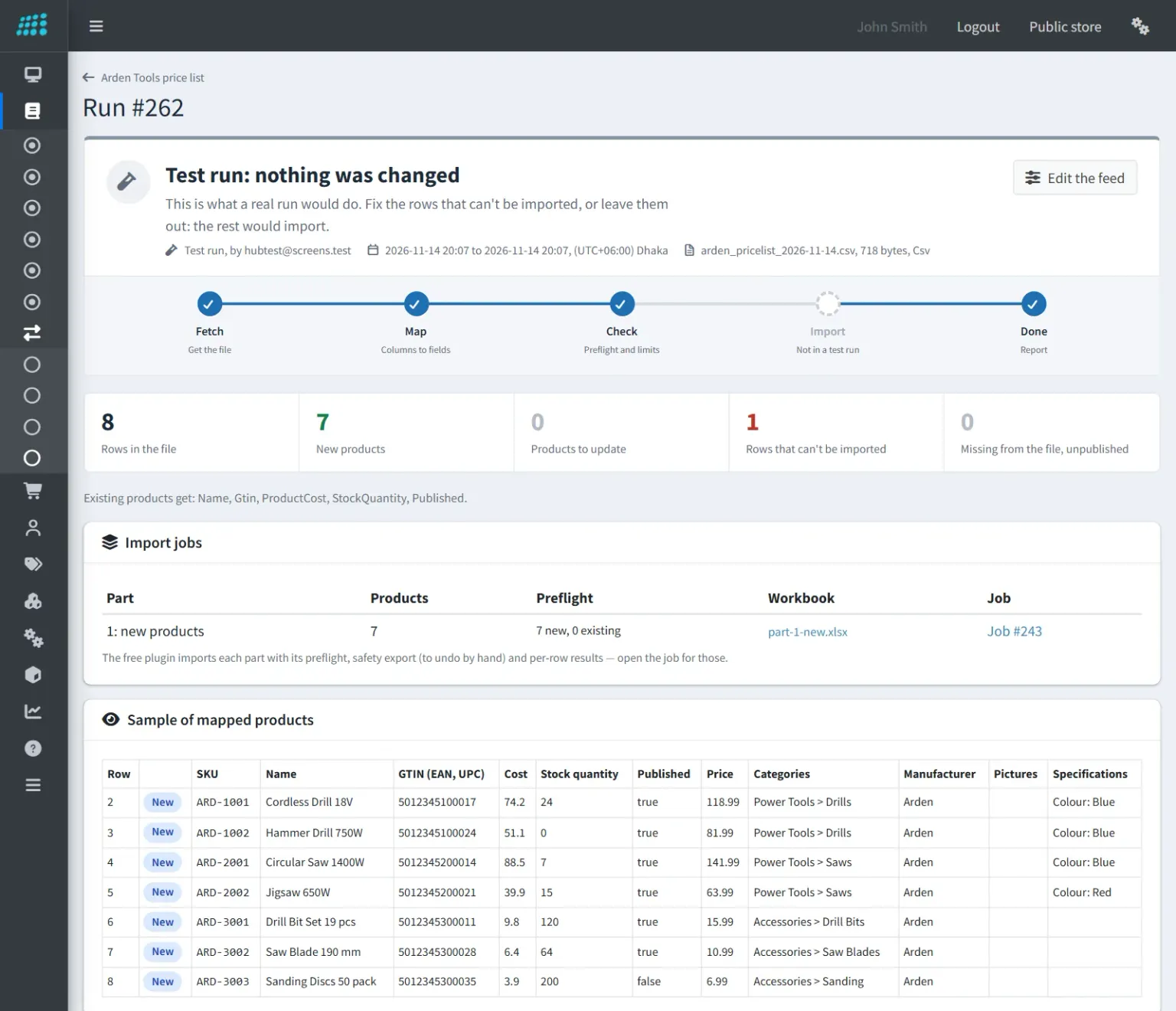
A test run does everything up to the import: fetches the file, maps it, prices it and runs the free plugin’s checks. It shows a sample of products as they’d be saved, the rows that can’t be imported and why, and products that would go missing. Nothing in the store changes.

  • Values that aren’t in a value map are listed
  • Every row that fails says which column and why
  • Run it as often as you like while you set the feed up

Supplier feeds → Runs → Test run

Test run of the Arden Tools price list: nothing was changed. Stages Fetch, Map, Check and Done; 8 rows in the file, 7 new products, 0 to update and 1 row that can’t be imported; and a sample of mapped products such as Cordless Drill 18V at a cost of 74.20 and a price of 118.99 in Power Tools > Drills, with Colour: Blue

Safety holds

Held runs wait for a person

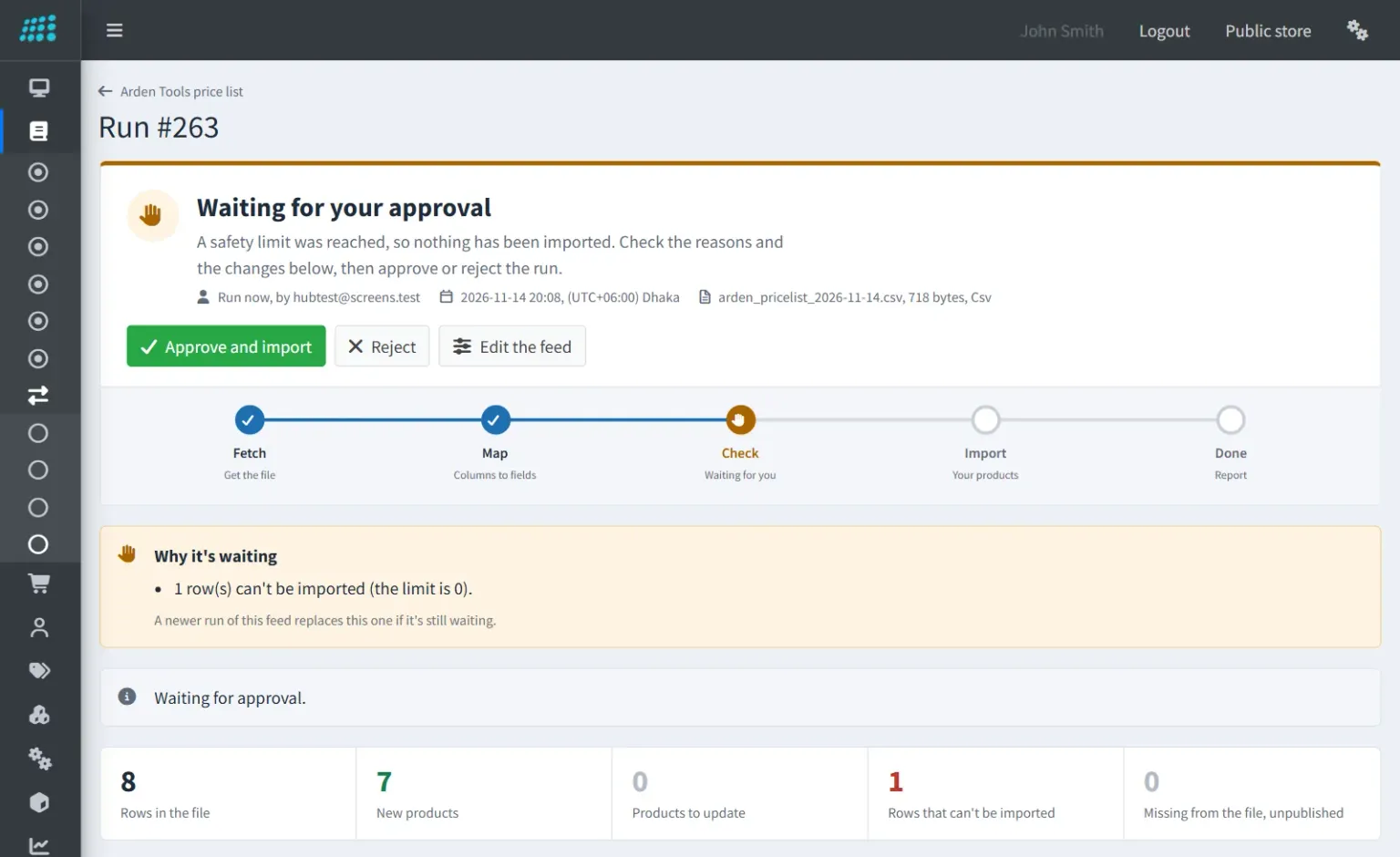
When a run breaks one of your limits, it stops before the import and says why. You get an email, check the numbers on the run page, and approve or reject it. A newer run replaces a held one, so an old file never goes in by accident.

  • Limits for rows, errors, missing products and price changes
  • “Hold every run” while you get to know a new feed
  • The free plugin exports the affected products before every import

Supplier feeds → Runs → Waiting for approval

Run of the Arden Tools price list waiting for approval: a safety limit was reached because 1 row can’t be imported and the limit is 0, so nothing has been imported. Buttons to approve and import, reject or edit the feed, and counts of rows, new products, updates, errors and missing products

Undo

Take back an import, whole

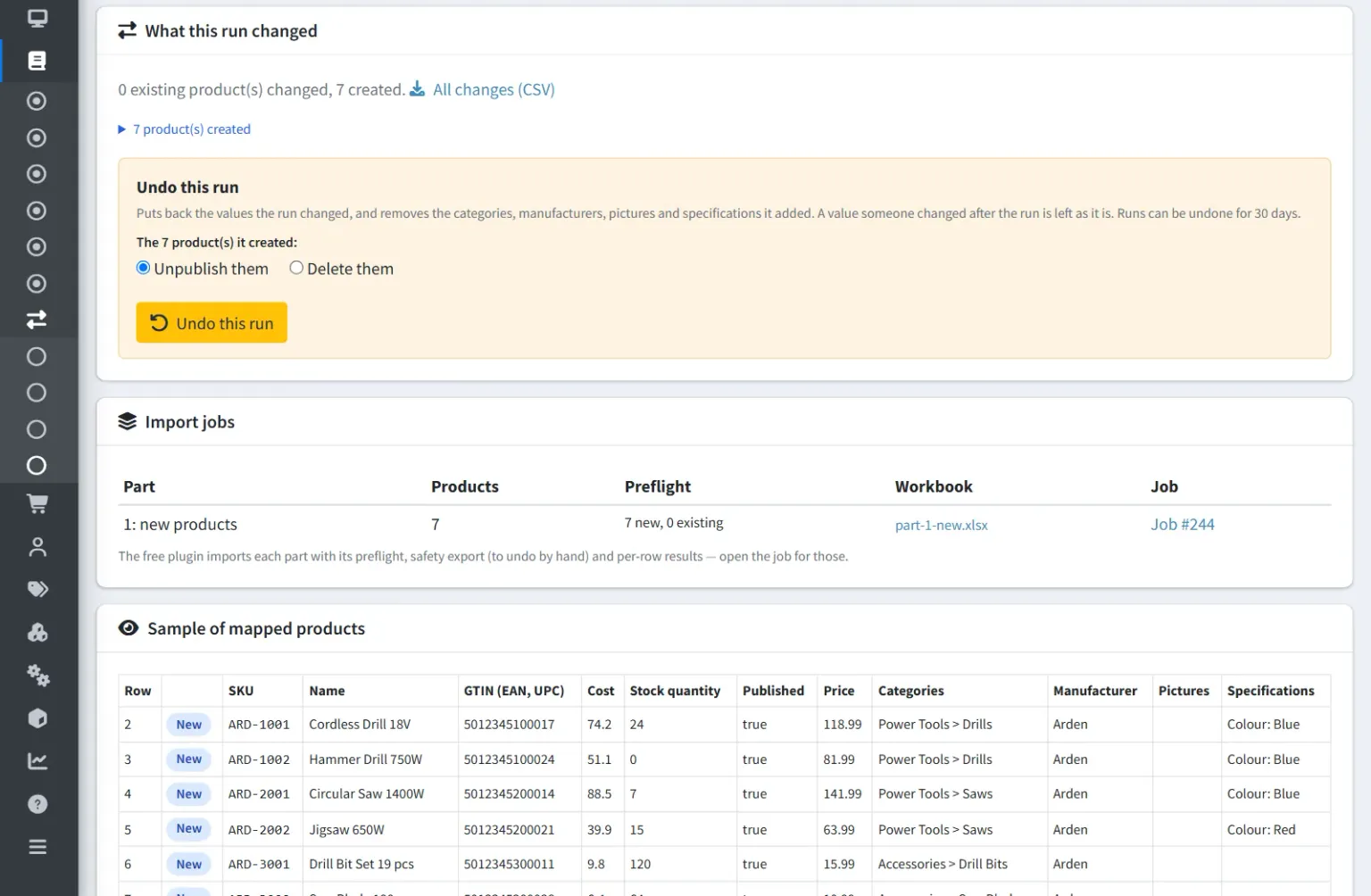
Every import keeps what it changed. Undo puts each value back, removes the categories, manufacturers, pictures and specifications the run added, and unpublishes or deletes the products it created. A value someone changed after the run is left alone and listed.

  • Runs can be undone for 30 days, or as long as you set
  • Every change downloads as a CSV, before and after
  • Products a run hid because they were missing come back too

Supplier feeds → Runs → Arden Tools price list

Run page after the approved Arden Tools import: 7 products created, a link to all changes as CSV, and an Undo this run panel that puts changed values back and removes what the run added, with a choice to unpublish or delete the 7 products it created. Below, the import job and a sample of the imported products

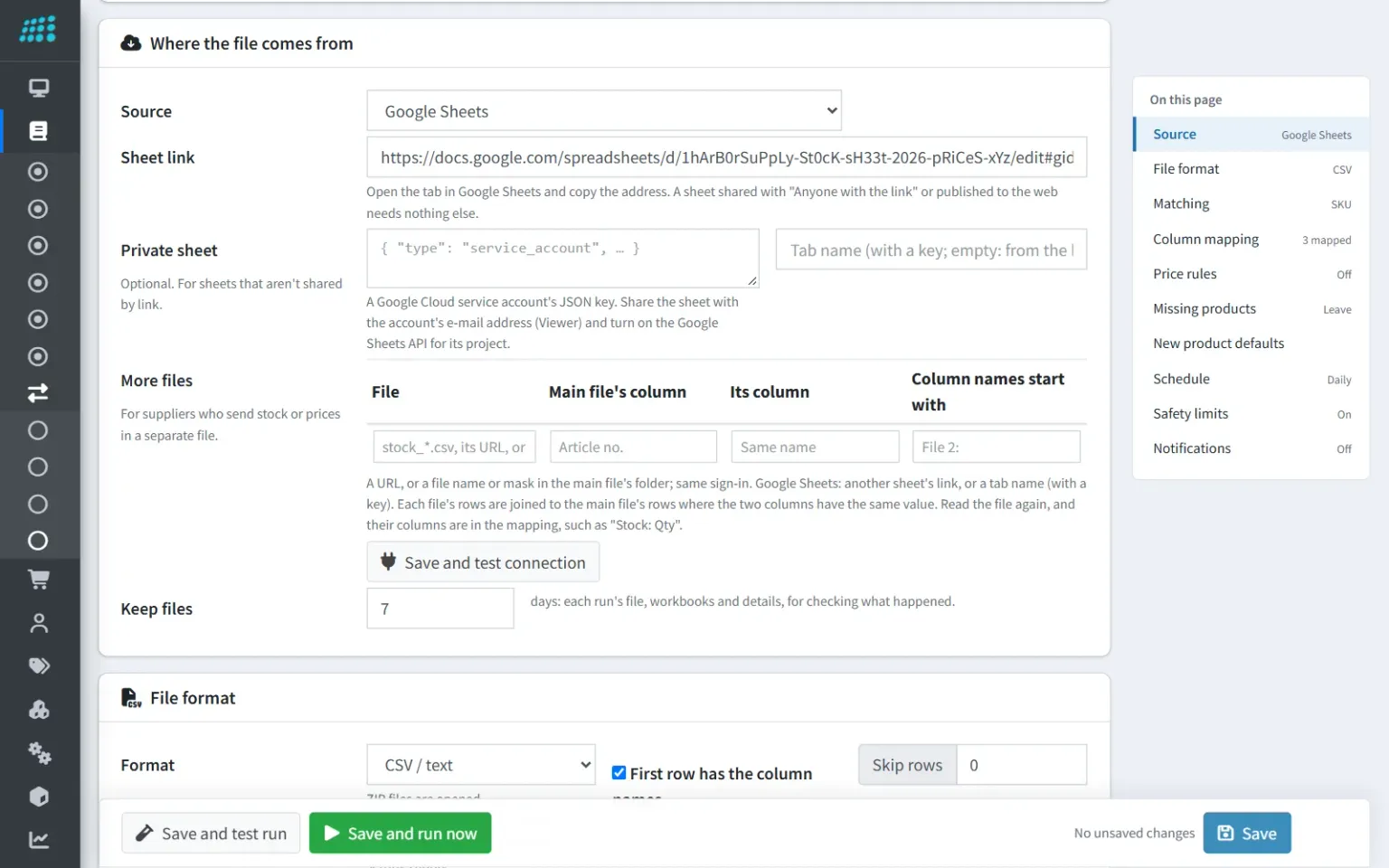
Google Sheets

Suppliers who keep their list in a Google Sheet

Paste the sheet’s link. A sheet shared with “Anyone with the link” or published to the web is read with no sign-in. For a private sheet, add a Google service account’s key, stored encrypted, and share the sheet with it. A second file, such as a separate stock list, can be joined to the main one by a column.

  • Pick the tab by its link or, with a key, by name
  • JSON feeds too: a list at a path, objects by ID, or JSON Lines
  • Blank rows in a sheet are skipped

Supplier feeds → Harbor Supply stock sheet → Source

Feed editor on the Source section with Google Sheets chosen: the sheet’s link, an optional service account key and tab name for a private sheet, more files joined by a column, and how many days to keep each run’s files

Beyond supplier feeds

Exports, bulk edits and the rest of your store’s data.

The same sources, schedules, safety limits and run pages work for product exports, bulk edits, and imports of customers, orders, discounts and redirects.

Scheduled exports

Send your products to dealers and marketplaces

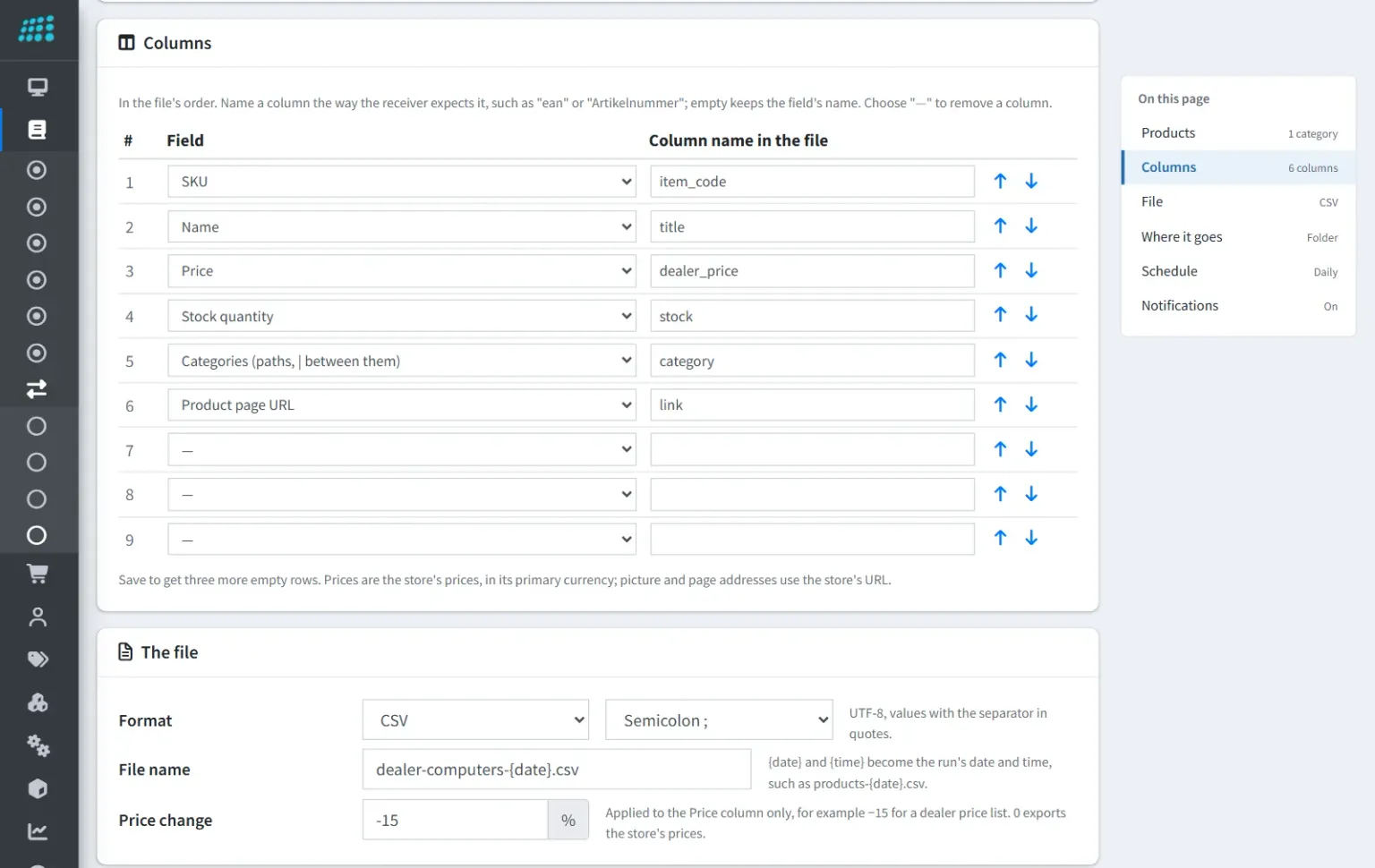
Pick products by category, brand, vendor or SKU, choose the columns and name them the way the receiver wants. Pro writes CSV or Excel on a schedule and puts it on their FTP or SFTP, emails it, or serves it at a private link that always has the newest file.

  • Change the price column for dealer lists, such as 15% off
  • Category paths, picture links and product page URLs as columns
  • “Changed since the last export” sends only what changed

Exports → Dealer price list: computers → Columns

Export editor on the Columns section: SKU, name, price, stock, category paths and product page URL renamed to item_code, title, dealer_price, stock, category and link, in a semicolon CSV named dealer-computers-{date}.csv with prices lowered by 15 percent

Bulk edit

A sale on a whole category in one step

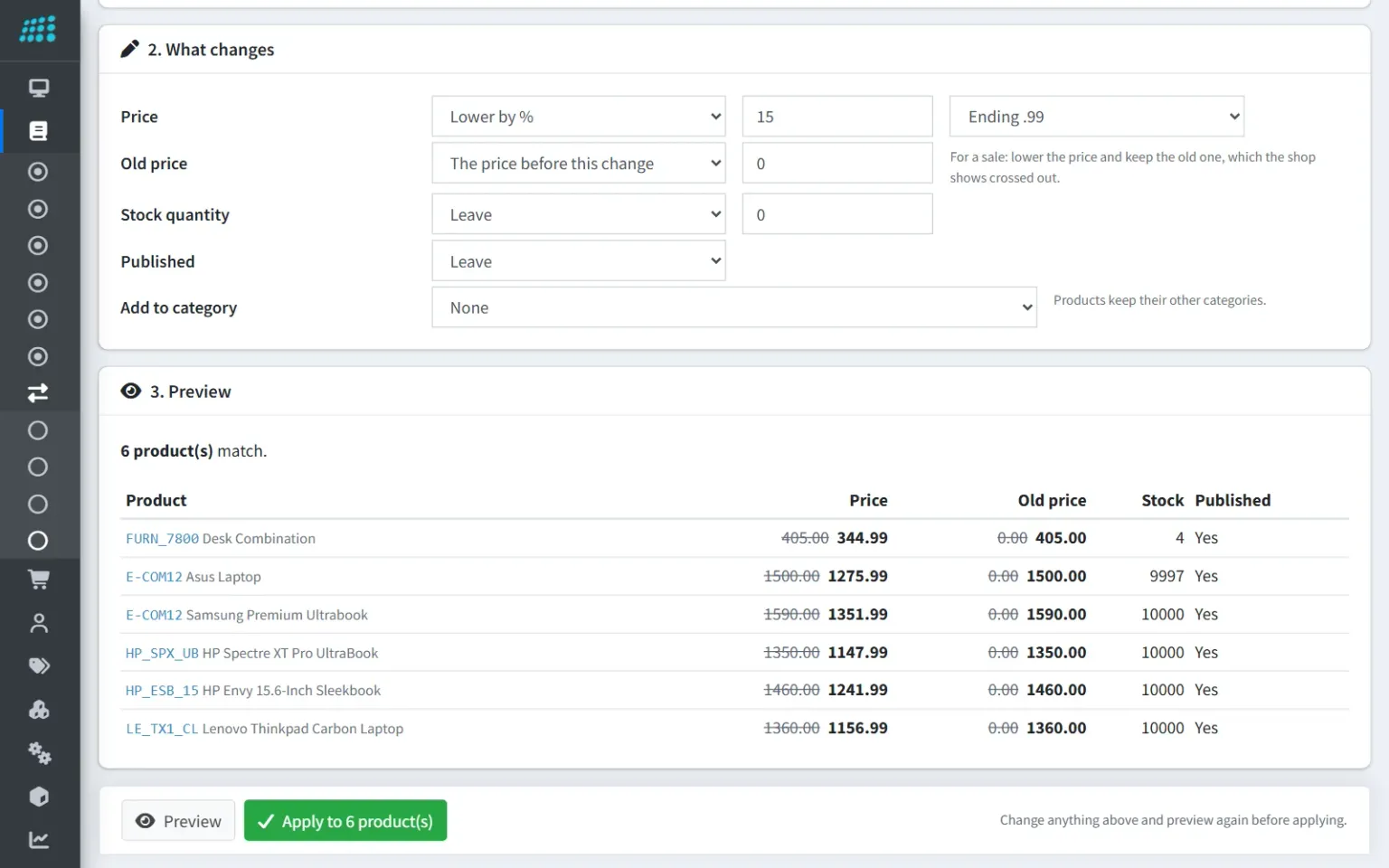
Pick products the same way, then lower or raise prices by a percentage or amount, keep the old price for the crossed-out sale price, set or add stock, publish or hide them, or add them to a category. The preview shows the new values, and applying it runs as an import you can undo.

  • Prices rounded the same way as price rules, such as .99
  • The free plugin’s checks and safety export run as usual
  • Every bulk edit is listed with the other runs

Bulk edit → Preview

Bulk edit with a preview: lower the price by 15 percent ending in .99 and keep the price before the change as the old price, for the 6 products in Notebooks, such as Asus Laptop from 1500.00 to 1275.99 with an old price of 1500.00, and a button to apply it to 6 products

Modules

Customers, orders, discounts and redirects

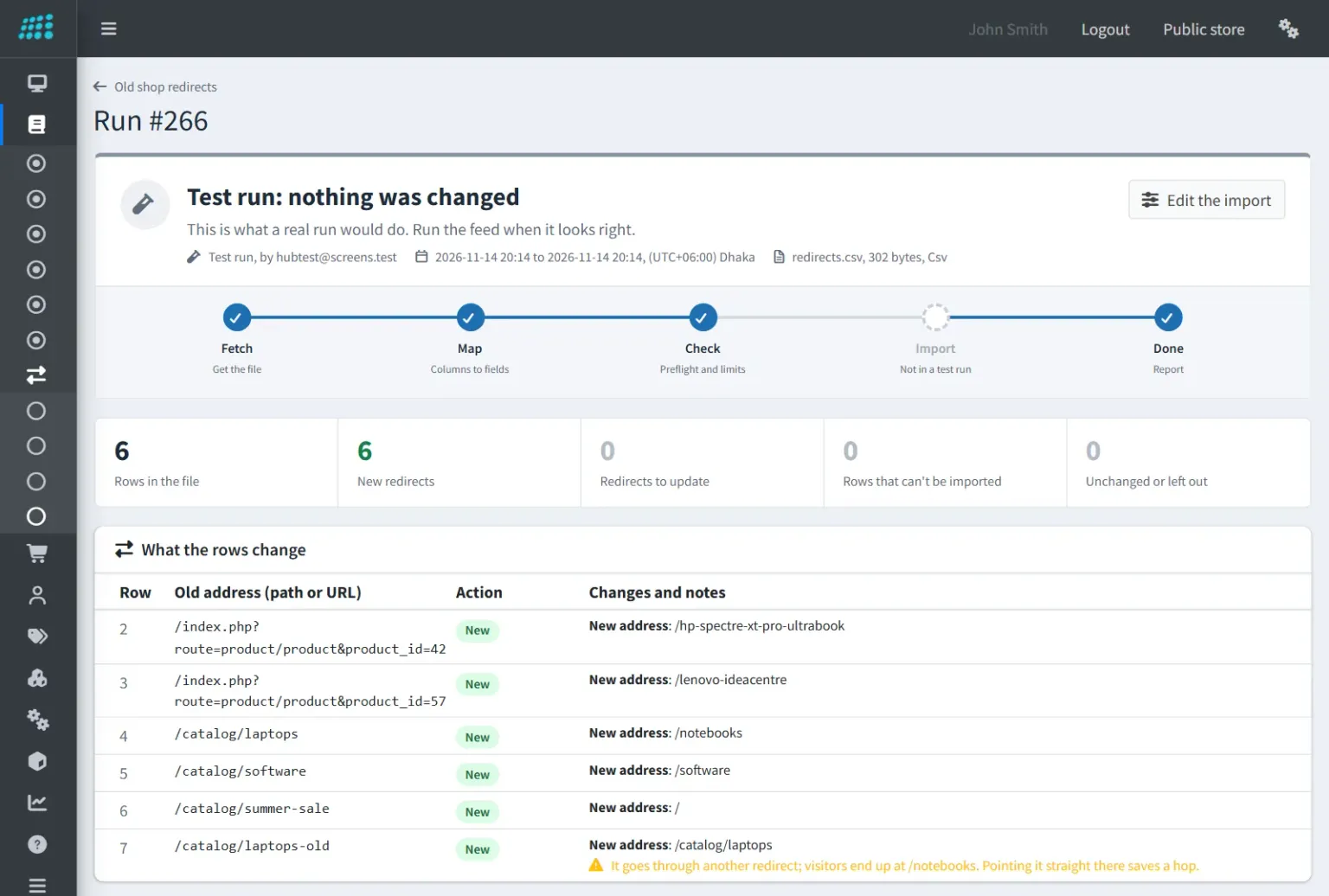
Turn on the modules you need, each with its own permission. Import and export customers and discounts, update order statuses and tracking numbers from a carrier’s file, and import redirects and new SEO names when you move from another shop. Each row is planned first, so a test run shows what it would change.

  • Customers matched by email; administrators are never changed
  • Redirects that loop or point to another redirect are caught
  • Same sources, schedules, safety limits and run pages as feeds

Redirects → Old shop redirects → Test run

Test run of an old shop’s redirects: 6 rows, 6 new redirects, such as /catalog/laptops to /notebooks and an old index.php product address to its new page, and a note that one redirect points to another redirect, so visitors end up at /notebooks

Free and Pro

The free plugin stays free on any number of stores. Pro adds supplier feeds, exports, bulk edits and more on top of it and uses its checks for every product import; installing or removing Pro never changes what the free plugin does.

What the free Product Data Exchange plugin and Product Data Exchange Pro include
FeatureFree plugin$0Free on any number of storesGet the Free PluginProLoading priceone-time, per storeTell Me When It’s Ready
Move products between stores
Excel workbooks and ZIP packagesProducts with categories, attributes, pictures and moreIncludedIncluded
Preflight check and approvalIncludedIncluded
Background jobs with results per rowIncludedIncluded
Export of affected products before each importIncludedIncluded
Import from suppliers
Fetch from URL, FTP, SFTP, a folder or Google SheetsNot includedIncluded
CSV, Excel, XML and JSON in the supplier’s layoutColumns mapped once, values translatedNot includedIncluded
SchedulesNot includedHours or set times
Prices from cost with rules and a minimum marginNot includedIncluded
Products missing from the fileNot includedHide, zero stock or delete
Safety holds and approval by emailNot includedIncluded
Test runsNot includedIncluded
Email and webhook reportsNot includedIncluded
Undo an importNot included30 days, or as you set
More than feeds
Scheduled exportsTo FTP, SFTP, email or a private linkNot includedIncluded
Bulk edit of prices, stock and categoriesNot includedIncluded
Customers and discounts, import and exportNot includedIncluded
Order statuses and tracking numbers from a fileNot includedIncluded
Redirects and SEO namesNot includedIncluded
Licence and support
nopCommerce 4.70, 4.80, 4.90 and 5.00IncludedIncluded
Try before you payAlways freeSet up and test-run without a licence
UpdatesFree releases12 months, renewable
SupportBest effort, by emailBy email

How the licence works

  • One licence covers one store’s domains and their subdomains. “www.” is ignored.
  • Checked offline inside nopCommerce. Pro never calls home.
  • Without a licence you can set everything up and run tests. Imports, exports, bulk edits and schedules need the licence.
  • Works fully on localhost, 127.0.0.1 and .test or .local addresses, so you can try it on a copy of your store.
  • A lifetime licence: pay once. It never expires.
  • Includes 12 months of updates and email support.

Install in four steps

  1. 1 Update the free Product Data Exchange plugin to release 50 or later and restart. Pro won’t load next to an older release.
  2. 2 Upload the Pro ZIP in Configuration → Local plugins, restart, install it and restart again. One package covers 4.70, 4.80, 4.90 and 5.00.
  3. 3 Open Catalog → Product Data Exchange → Supplier feeds, add a feed and read the supplier’s file once to map its columns.
  4. 4 Run a test, add your licence under Settings, and turn on the schedule. Exports, bulk edit and the modules have their own tabs.

Feeds can be exported as a file, without passwords, and imported into another store.

Frequently asked questions

What does Product Data Exchange Pro need?

nopCommerce 4.70, 4.80, 4.90 or 5.00 and the free Product Data Exchange plugin, release 50 or later. Every feed run goes through the free plugin’s preflight, import job and safety export, so Pro needs it installed.

Which file formats and sources does it read?

CSV and text files with any separator and encoding, Excel (.xlsx), XML and JSON, plain or in a ZIP. Files come from a URL, FTP or FTPS, SFTP with a password or private key, a folder on the web server, Google Sheets, or an upload for each run.

Can it only update prices and stock?

Yes. Choose “update only” and limit existing products to the fields you name, such as price and stock. Rows for products you don’t sell are skipped, and an empty cell never blanks a field.

What happens if a supplier sends a broken file?

Rows with bad numbers, repeated SKUs or two matching products are listed and skipped. If more rows fail than you allow, or the file is too short, prices jump too far or many products would go missing, the whole run waits for your approval and you get an email.

Can I undo an import?

Yes, for 30 days by default. Undo puts back every value the run changed, removes what it added and unpublishes or deletes the products it created. Anything someone changed after the run is left alone and listed.

Does it export products too?

Yes. Scheduled exports send chosen products and columns as CSV or Excel to FTP, SFTP, a folder or email, or at a private link that always has the newest file. A price change, such as 15% off for dealers, can be applied to the price column.

Can I try it before buying?

Yes. Without a licence you can set up feeds, read suppliers’ files and run tests that show exactly what would change. On a development copy of your store (localhost, .test or .local) everything works without a licence, imports and schedules included.

Is the licence a subscription?

No. You pay once and the licence never expires. It includes 12 months of updates and email support.

Does Pro send my data anywhere?

No. The licence is checked offline, and files are fetched only from the sources you set up. Reports go only to the email addresses and webhook you choose.
Want supplier feeds on your store?

Purchasing opens soon, with a one-time price for a lifetime licence. Email us and we’ll send Pro as soon as it’s ready, or ask whether it handles your suppliers’ files.